Most organizations assume their cloud provider handles security. That assumption is responsible for a significant percentage of cloud data breaches.
The reality is simpler and more demanding: cloud security is a shared responsibility, and the line between what your provider protects and what you protect determines whether your data stays safe. This guide breaks down exactly who owns what across IaaS, PaaS, and SaaS, the risks that emerge when boundaries blur, and the practices that keep cloud environments secure.
What is cloud data security?
Cloud data security covers the technologies, policies, and practices that protect information stored, processed, and transmitted across cloud environments. This includes encryption, access controls, network protections, and compliance measures that keep data safe from unauthorized access and breaches.
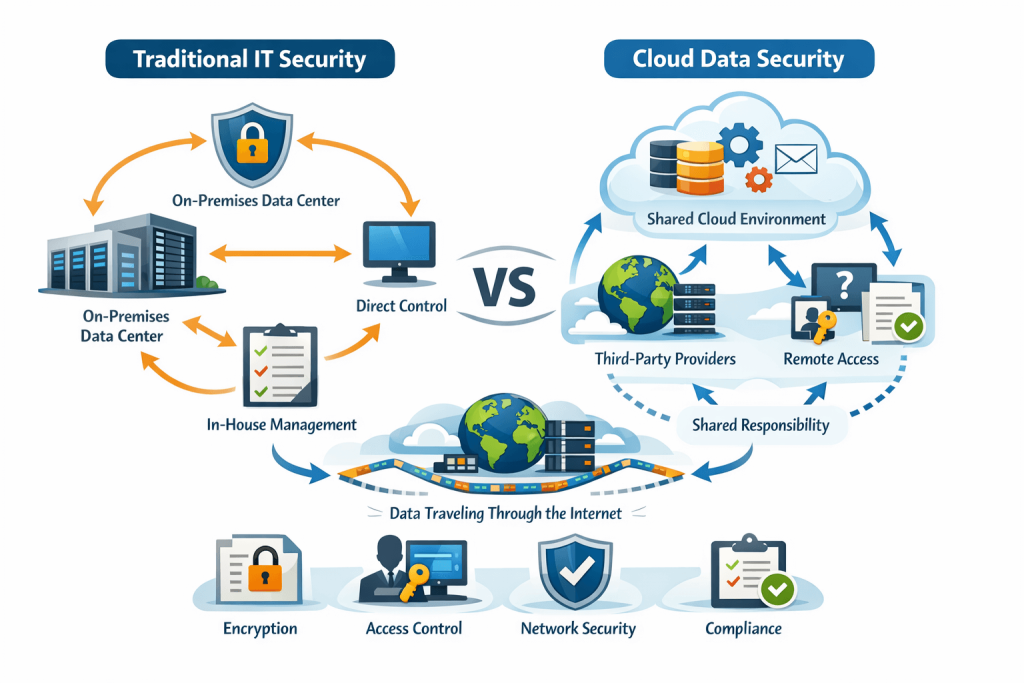
What makes cloud security different from traditional IT security? Your data lives in someone else's data center, travels through shared networks, and gets processed by services you don't directly control. That distributed reality is exactly why the question of responsibility gets complicated.
Who is responsible for data security in the cloud
Data security in cloud computing is a shared responsibility between the cloud service provider and the customer. Providers like AWS, Azure, and Google Cloud handle the security of the cloud—the infrastructure, hardware, and physical data centers. Customers handle security in the cloud—data protection, access management, and configuration.
That single preposition makes all the difference. The provider secures the building. You secure what's inside your apartment.
What cloud service providers are responsible for securing
Cloud providers own the foundational layers that make cloud computing work. Their responsibility starts at the physical level and extends up through the virtualization layer.
- Physical security: Data center access controls, surveillance, environmental protections, and hardware disposal
- Network infrastructure: Core firewalls, DDoS mitigation, network segmentation between tenants
- Platform availability: Hardware maintenance, power redundancy, and disaster recovery for their infrastructure
When AWS promises high availability for a service, they're committing to keeping that underlying infrastructure running. They patch hypervisors, replace failing drives, and maintain the compute fabric you build on.
What customers must secure themselves?
Everything you deploy, configure, and store in the cloud falls under your responsibility. The provider gives you tools, but implementation is on you.
- Data protection: Choosing encryption methods, managing keys, classifying sensitive information, maintaining backups
- Access management: Defining user permissions, enforcing authentication policies, rotating credentials, auditing access
- Application security: Securing your code, protecting APIs, configuring workloads correctly, patching your operating systems
A misconfigured S3 bucket that exposes customer data? That's on you, not AWS. The provider secured the storage service itself, but you chose to leave the door open.
The shared responsibility model explained
The shared responsibility model is the framework that defines exactly where provider obligations end and customer obligations begin. Every major cloud provider publishes their version, and while details vary slightly, the core concept stays consistent.
Think of it like renting an apartment. The landlord maintains the building structure, plumbing, and electrical systems. You're responsible for locking your door, not leaving the stove on, and keeping your belongings safe.
| Security Domain | Provider Responsibility | Customer Responsibility |
|---|---|---|
| Physical infrastructure | ✓ | |
| Network controls | ✓ | Partial (security groups, NACLs) |
| Hypervisor and host OS | ✓ | |
| Guest operating systems | ✓ (IaaS) | |
| Applications | ✓ | |
| Data encryption | Tools provided | Implementation and key management |
| Identity and access | Platform tools (IAM) | Configuration and policies |
Misunderstanding this model is one of the leading causes of cloud security incidents. Teams often assume the provider handles encryption or access management, then discover too late that they were supposed to configure those controls themselves.
How responsibility shifts across IaaS, PaaS, and SaaS
The exact split of responsibility changes depending on which service model you use. As you move from infrastructure to platform to software services, more responsibility shifts to the provider. However, you never fully hand off data security.
1. Infrastructure as a service
IaaS gives you the most control and the most responsibility. You get virtual machines, storage, and networking, but everything above the hypervisor is yours to manage.
With AWS EC2 or Azure VMs, you're responsible for the operating system, middleware, runtime, applications, and data. The provider handles only the physical hardware and virtualization layer. This model works well when you need flexibility, though it demands significant security expertise.
2. Platform as a service
PaaS shifts more of the stack to the provider. Services like AWS Elastic Beanstalk or Azure App Service manage the operating system and runtime for you.
You still own your application code, data, and access controls. On the other hand, you no longer worry about OS patches or runtime updates. The tradeoff is less control over the underlying environment, which can complicate certain security configurations.
3. Software as a service
SaaS places the most responsibility on the provider. With services like Salesforce or Microsoft 365, the provider manages nearly everything.
Your responsibility narrows to data, user access, and configuration settings. You decide who can access the application, what data goes into it, and how it integrates with other systems. Even here, a misconfigured sharing setting can expose sensitive information.
How secure is your data in the cloud
Cloud environments can be highly secure—often more secure than on-premises alternatives. Major providers invest heavily in security infrastructure, employ dedicated security teams, and maintain certifications that most organizations couldn't achieve independently.
The catch? Security depends on proper configuration, not just provider choice. A well-configured cloud environment with clear responsibility boundaries outperforms a poorly managed on-premises data center. The reverse is also true.
Most cloud breaches don't happen because providers failed. They happen because customers left gaps: exposed credentials, overly permissive access, unencrypted data, or missing monitoring.
Common cloud computing and data security risks
Security risks in cloud environments typically emerge from responsibility gaps—places where either the provider failed, the customer failed, or the boundary wasn't clear.
1. Data breaches and misconfigurations
Misconfigurations remain the most common cause of cloud data breaches. Open storage buckets, exposed databases, and overly permissive security groups create attack surfaces that didn't need to exist.
Database security in cloud computing requires careful attention to access controls, network exposure, and encryption settings. The provider secures the database service, but you configure who can connect and what they can see.
2. Insecure APIs
APIs connect cloud services and represent significant attack surfaces. Weak authentication, excessive permissions, and missing rate limiting all create opportunities for attackers.
Every API endpoint you expose becomes your responsibility to secure. This includes validating inputs, enforcing authentication, and monitoring for abuse.
3. Insider threats
Not all threats come from outside. Employees, contractors, and partners with legitimate access can intentionally or accidentally expose data.
Strong identity and access management practices—least privilege, regular access reviews, and activity monitoring—help mitigate insider risks.
4. Account hijacking and credential misuse
Stolen credentials give attackers legitimate-looking access to your cloud resources. Phishing, credential stuffing, and weak passwords all contribute to this risk.
Multi-factor authentication and privileged access management significantly reduce the impact of compromised credentials.
5. Inadequate security management
Many organizations lack visibility into what they've deployed and how it's configured. Without unified monitoring across cloud environments, security gaps go unnoticed until something breaks.
This is where observability directly supports security. You can't protect what you can't see.
Cloud data security best practices
Each practice below addresses a specific gap that commonly leads to security incidents.
1. Enable advanced encryption
Encryption protects data even when other controls fail. Implementing encryption at rest for stored data and in transit for data moving between services adds a critical layer of defense.
- At rest: AES-256 encryption for databases, object storage, and volumes
- In transit: TLS 1.2 or higher for all network communication
- Key management: Customer-managed keys give you control; provider-managed keys simplify operations
The provider offers encryption tools. You decide what gets encrypted and manage the keys.
2. Strengthen identity and access management
IAM forms the foundation of cloud security. Weak access controls undermine every other security measure.
- Least privilege: Grant only the permissions required for each role
- Role-based access: Assign permissions to roles, then assign users to roles
- MFA enforcement: Require multi-factor authentication for all privileged accounts
Regular access reviews help catch permission creep before it becomes a problem.
3. Use unified visibility and monitoring
Consolidated metrics, logs, and traces across your cloud environment enable faster threat detection and incident response. Fragmented monitoring tools create blind spots.
Unified observability helps teams correlate events across services, identify anomalies, and understand the full scope of security incidents. This becomes especially important in multi-cloud and hybrid environments where data flows across boundaries.
4. Implement data loss prevention
DLP tools detect and prevent unauthorized data movement. They help enforce policies around sensitive information like customer data, financial records, and intellectual property.
You define what data is sensitive and how it can be used. DLP tools then monitor for violations and block unauthorized transfers.
5. Establish security governance and compliance
Governance frameworks ensure consistent security practices across teams and environments. This includes policy definition, audit trails, and regulatory compliance.
Compliance with standards like GDPR, HIPAA, or SOC 2 is always a customer responsibility. Provider certifications help, but you're accountable for how you use their services.
Why unified observability strengthens cloud security
You can't secure what you can't see. Unified observability—consolidated metrics, logs, and traces in a single view—gives teams the visibility required to detect threats, investigate incidents, and maintain security posture.
Traditional monitoring answers whether systems are up or down. Observability answers why systems behave the way they do. That deeper understanding helps security teams distinguish between normal anomalies and genuine threats.
Smart alerting reduces noise so teams can focus on what matters. When every alert demands attention, critical security events get lost in the flood. Intelligent correlation surfaces the signals that indicate real problems.
Tip: Teams running Kubernetes and multi-cloud environments benefit most from unified dashboards that correlate events across clusters and providers. Cross-environment visibility is essential for tracking lateral movement and understanding blast radius during incidents.
How Obsium helps teams secure cloud environments
At Obsium, we help teams build the observability foundations that support both operational reliability and security posture. Our approach combines unified metrics, logs, and traces with smart alerting that cuts through noise.
For organizations running Kubernetes and multi-cloud environments, we provide visibility across clusters and providers from a single dashboard. This unified view helps teams detect anomalies faster, investigate incidents more effectively, and maintain consistent security practices.
Our 24/7 managed monitoring extends coverage for teams that lack the bandwidth for round-the-clock security operations. We handle alert triage and escalation so your team can focus on remediation rather than monitoring.
FAQs about cloud data security responsibility
Is the customer always responsible for security in the cloud?
Customers share responsibility with providers under the shared responsibility model. Customers always own data protection, access management, and application security regardless of which service model they use.
Who shares the responsibility for cloud security between providers and customers?
Cloud providers secure the infrastructure and platform layers. Customers secure their data, applications, user access, and configurations. The exact split depends on whether you use IaaS, PaaS, or SaaS.
How does database security work in cloud computing environments?
Database security in cloud computing requires customers to manage access controls, encryption settings, and backup policies. Providers secure the underlying database platform and infrastructure, but configuration choices remain with the customer.
What happens when a cloud data breach results from provider negligence?
When breaches stem from provider infrastructure failures, the provider bears responsibility. Contracts and SLAs define liability limits, so reviewing shared responsibility documentation and maintaining cyber insurance helps protect against gaps.