Both terms end in “Ops.” Both are about shipping software through automation, both revolve around Git, and both are raised by the same engineers in the same meetings. The comparison feels natural enough, but it puts two things side by side that were never the same kind of thing.
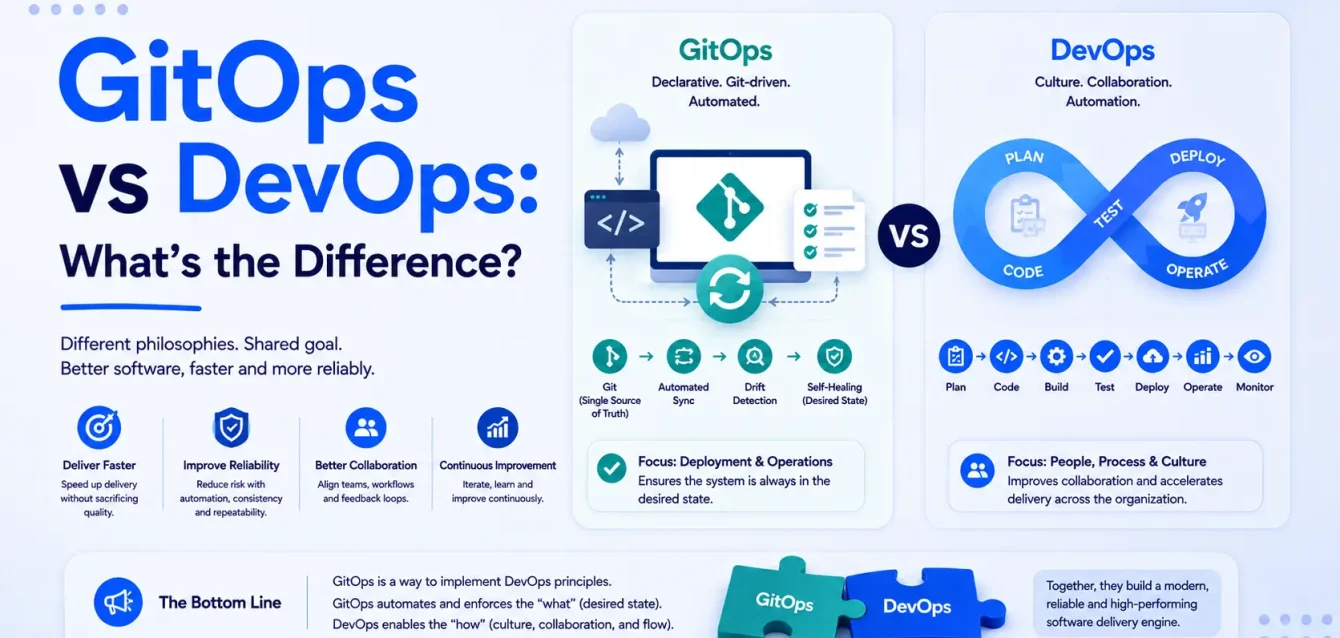
DevOps is a culture and set of practices covering the entire software delivery lifecycle. GitOps is a specific operational model for one slice of that lifecycle: deployment. Asking which to pick is like asking whether to choose Agile or stand-ups.
That distinction matters more than it sounds, because teams that get it wrong either dismiss GitOps as rebranding, or adopt it expecting it to fix problems it has nothing to do with — flaky tests, unclear ownership, a broken on-call rota.
GitOps is worth understanding on its merits. Argo CD alone now runs in nearly 60% of Kubernetes clusters among surveyed users, with 97% of respondents using it in production, up from 93% in 2023 (CNCF Argo CD End User Survey 2025).
We’ve helped teams adopt GitOps and talked others out of it, and the mistake is almost always the same one: treating it as a bigger, better DevOps rather than a specific technique for one job. Get that framing right, and the rest — the security payoff, the repo structure, knowing when to skip it entirely — follows naturally.
The short answer
| DevOps | GitOps | |
|---|---|---|
| Category | Culture and practices | Operational model |
| Scope | Whole delivery lifecycle: plan, build, test, deploy, operate | Deployment and cluster state |
| Answers | “How do we ship software well as an organization?” | “How does declared state get into the cluster?” |
| Requires | No specific tools | Git, declarative config, a reconciliation agent |
| Can exist without the other? | Yes, and did for a decade | No — GitOps is a way of doing DevOps |
You do not choose between them. You do DevOps, and GitOps is one way to handle the deployment part.
What is DevOps?
DevOps is a cultural and technical movement aimed at shortening the distance between writing code and running it in production, primarily by removing the wall between development and operations teams.
The tooling gets the attention. The cultural part is what actually determines whether it works.
The cultural core
- Shared ownership. The team that builds a service runs it. No throwing releases over a wall.
- Blameless postmortems. Incidents are treated as system failures, not people failures, so the real causes surface.
- Fast feedback loops. Engineers learn quickly whether a change worked, in test and in production.
- Continuous improvement. Process is treated as something you iterate on, not something you inherit.
Teams that install Jenkins and declare themselves DevOps, while keeping a separate ops team that owns deploys and a change advisory board that meets fortnightly, have bought tooling and skipped the point. We went through the practices that actually move the needle in DevOps best practices.
CI/CD
Continuous integration: developers merge small changes frequently, and every merge triggers an automated build and test run.
Continuous delivery: every change that passes tests is releasable. Releasing is a decision, not a project.
Continuous deployment: every change that passes tests deploys automatically, with no human gate.
Most organizations do CI well and CD partially. The gap between “we could release this” and “we do release this” is where GitOps ends up being relevant.
Infrastructure as code
Infrastructure defined in version-controlled files rather than assembled by hand. Terraform, CloudFormation, Pulumi, Ansible. This predates GitOps and is a prerequisite for it, though the two often get conflated.
Monitoring and feedback
You can’t improve what you can’t see. Metrics, logs, traces, and alerting close the loop between deploying a change and knowing whether it helped, which is the part teams most often under-build — see why observability is the missing piece in modern DevOps.
Measuring DevOps: the DORA metrics
Four metrics from DORA research have become the standard way to assess delivery performance:
| Metric | What it measures |
|---|---|
| Deployment frequency | How often you ship to production |
| Lead time for changes | Commit to running in production |
| Change failure rate | Percentage of deploys causing degradation |
| Time to restore service | How fast you recover from failure |
The first two measure speed, the last two stability, and the useful insight from the research is that they move together rather than trading off. We went deeper in DevOps metrics that actually matter.
Common DevOps tools
CI/CD (Jenkins, GitHub Actions, GitLab CI, CircleCI), IaC (Terraform, Ansible, Pulumi), containers (Docker, Kubernetes), observability (Prometheus, Grafana, OpenTelemetry), and version control (Git, universally).
Notice that Git appears in the DevOps toolchain already. GitOps isn’t about introducing Git. It’s about what Git is authoritative for.
What is GitOps?
GitOps is an operational model where the desired state of your system lives in Git, and software agents continuously reconcile the running system against it.
The term came out of Weaveworks in 2017. The standard is now maintained by the GitOps Working Group under CNCF, which publishes OpenGitOps.
The four principles
The v1.0.0 principles, stated exactly as OpenGitOps defines them:
- Declarative — “A system managed by GitOps must have its desired state expressed declaratively.”
- Versioned and Immutable — “Desired state is stored in a way that enforces immutability, versioning and retains a complete version history.”
- Pulled Automatically — “Software agents automatically pull the desired state declarations from the source.”
- Continuously Reconciled — “Software agents continuously observe actual system state and attempt to apply the desired state.”
Source: OpenGitOps Principles v1.0.0
Each rules something out. Declarative rules out imperative scripts. Versioned and immutable rules out mutable config stores. Pulled automatically rules out pushing from CI. Continuously reconciled rules out one-shot deploys that never check again.
If you’re pushing from Jenkins with kubectl apply, you have automated deployment. You don’t have GitOps, because principles 3 and 4 aren’t satisfied.
“GitOps is the best thing since configuration as code. Git changed how we collaborate, but declarative configuration is the key to dealing with infrastructure at scale, and sets the stage for the next generation of management tools.” — Kelsey Hightower, Staff Developer Advocate, Google (OpenGitOps)
Git as the single source of truth
If it’s running in the cluster, it’s described in Git. Anything applied outside Git is drift, and the agent will revert it.
That last part surprises people. Under GitOps, a kubectl edit to fix something at 2am gets undone within minutes. That’s the system working, and it’s also why emergency procedures need thinking through before you adopt it.
Pull-based deployment and why it matters
This is the strongest technical argument for GitOps and the one most articles skim.
The push model (traditional CI/CD):
   CI SYSTEM                          CLUSTER
┌──────────────┐                  ┌─────────────┐
│ Jenkins /    │  kubectl apply   │             │
│ GH Actions   │─────────────────►│  Kubernetes │
│              │                  │   API       │
│ HOLDS:       │   (outbound      │             │
│ - kubeconfig │    from CI,      │  Accepts    │
│ - cluster    │    inbound to    │  inbound    │
│   credentials│    cluster)      │  connections│
└──────────────┘                  └─────────────┘
Your CI system holds credentials for every cluster it deploys to. The cluster accepts connections from outside. Compromise the CI system — through a malicious dependency, a leaked token, a poisoned build step — and you have production cluster access.
The pull model (GitOps):
   GIT REPO                           CLUSTER
┌──────────────┐                  ┌──────────────────┐
│ Manifests    │                  │  Argo CD / Flux  │
│ (desired     │◄─────────────────│   agent          │
│  state)      │   agent polls    │                  │
│              │   outbound       │  HOLDS:          │
└──────────────┘                  │  - git read creds│
                                  │  - in-cluster    │
   CI SYSTEM                      │    permissions   │
┌──────────────┐                  │                  │
│ Builds image │                  │  No inbound      │
│ Updates tag  │                  │  access needed   │
│ in Git       │                  └──────────────────┘
│              │
│ HOLDS:       │
│ - registry   │
│   creds      │
│ - git write  │
│ NO cluster   │
│ credentials  │
└──────────────┘
The agent runs inside the cluster and reaches out to Git. Nothing reaches in. Your CI system never holds cluster credentials, which removes an entire class of attack.
For teams running clusters in private networks, this also means you don’t need to expose the Kubernetes API to your CI system at all.
Key insight: If someone asks why GitOps is worth the operational overhead, the credential argument is usually the most persuasive one for a security-conscious organization. Pull-based deployment means a compromised CI pipeline can’t directly touch production.
Continuous reconciliation and drift detection
The agent compares Git against the cluster continuously. When they differ, it either reports drift or corrects it, depending on configuration.
This gives you two things ordinary CD doesn’t:
- Drift detection. Someone patches a Deployment by hand, and you find out rather than discovering it three months later during an incident.
- Self-healing. If auto-sync is on, the cluster returns to the declared state without anyone intervening.
The GitOps workflow
Developer                CI                    Git (config)         Cluster
    │                    │                          │                  │
    │  push code         │                          │                  │
    ├───────────────────►│                          │                  │
    │                    │ build + test             │                  │
    │                    │ push image:v1.8.3        │                  │
    │                    │                          │                  │
    │                    │ update image tag         │                  │
    │                    ├─────────────────────────►│                  │
    │                    │                          │                  │
    │                    │        ┌─────────────────┴────────┐         │
    │                    │        │  Agent polls, sees commit│         │
    │                    │        └─────────────────┬────────┘         │
    │                    │                          │  reconcile       │
    │                    │                          ├─────────────────►│
    │                    │                          │                  │
    │◄───────────────────┴──────────────────────────┴──────────────────┤
    │              observability confirms health                       │
Argo CD vs Flux
Both graduated from CNCF in December 2022, and both implement the four principles. They differ in shape rather than capability.
| Argo CD | Flux | |
|---|---|---|
| Interface | Full web UI, strong visualization | CLI and CRDs; UI via third parties |
| Architecture | Monolithic application controller | Composable GitOps Toolkit controllers |
| Multi-tenancy | Projects, RBAC, SSO built in | Namespace and RBAC based |
| Multi-cluster | Centralized by default; one instance, many clusters, with a multi-cluster UI | Capable via spec.kubeConfig on Kustomization/HelmRelease, but the conventional deployment is one instance per cluster |
| Scaling pattern | ApplicationSets | Kustomization and HelmRelease resources |
| Adoption | ~60% of surveyed K8s clusters | Widely used, smaller share |
| Best for | Teams wanting visibility and a UI for app teams | Teams preferring pure CLI/GitOps purity and composability |
Argo CD’s UI is the practical differentiator. If application developers need to see sync status without learning kubectl, that matters. Flux’s composability appeals to platform teams building their own abstractions on top.
Argo CD scored an NPS of 79 in the CNCF survey, with 42% of respondents managing over 500 applications per instance, up from just 15% in 2023 (CNCF).
GitOps vs DevOps: the full comparison
Comparing them dimension by dimension, with the caveat that these sit at different levels of abstraction.
| Dimension | DevOps | GitOps |
|---|---|---|
| Philosophy | Cultural: break down silos, share ownership | Technical: declared state in Git, reconciled by agents |
| Primary goal | Faster, more reliable delivery overall | Consistent, auditable, self-correcting deployments |
| Scope | Plan through operate | Deploy and maintain cluster state |
| Deployment model | Any — push, pull, manual, scripted | Pull only, by definition |
| Source of truth | Not prescribed | Git, always |
| Change management | Varies by org; tickets, approvals, or none | Pull request, reviewed and merged |
| Infrastructure management | IaC encouraged, not required | Declarative config required |
| Rollbacks | Depends on tooling; often a re-run or manual | git revert, agent reconciles back |
| Security model | Varies; CI often holds cluster credentials | CI holds no cluster credentials |
| Auditing | Scattered across CI logs, tickets, chat | Git history is the audit log |
| Automation | Broad: build, test, deploy, infra, ops | Focused on deployment reconciliation |
| Tooling | Wide and varied toolchain | Git plus an agent (Argo CD, Flux) |
| Kubernetes | Optional; works with VMs, serverless, bare metal | Strongly Kubernetes-oriented in practice |
| Compliance | Requires deliberate evidence collection | Git history provides much of it by default |
| Team workflows | Varies; may include a deploy button | Everything is a PR |
| Learning curve | Cultural change is the hard part | Moderate technically; the mindset shift is harder |
Why this comparison is a category error
Look at that table and notice something: the DevOps column keeps saying “varies” or “not prescribed.” That’s not a weakness in DevOps. It’s what happens when you compare a culture to an implementation.
DevOps doesn’t specify a source of truth because it isn’t that kind of thing. GitOps does, because it is.
You’ll find articles claiming these are “independent, standalone approaches,” or even that DevOps is subsidiary to GitOps. That inverts the relationship. GitOps is an operating model for cloud-native delivery, and delivery is one part of what DevOps covers.
The correct mental model
┌─────────────────────────────────────────────────────────┐
│                        DEVOPS                           │
│         (culture, practices, whole lifecycle)           │
│                                                         │
│  Plan → Code → Build → Test → Release → Deploy → Operate│
│                                          ▲              │
│                              ┌───────────┴───────────┐  │
│                              │       GITOPS          │  │
│                              │  (an operational      │  │
│                              │   model for this bit) │  │
│                              └───────────────────────┘  │
└─────────────────────────────────────────────────────────┘
GitOps is a choice you make about how deployment works, inside a DevOps practice.
How GitOps complements DevOps
CI stays the same, CD changes
Adopting GitOps barely touches your CI. Build, test, scan, push an image — all unchanged.
What changes is the last step. Instead of CI running kubectl apply or helm upgrade, it updates an image tag in a config repository and stops there.
Where the handoff happens
The concrete boundary, which is where most confusion lives:
DevOps/CI owns:
- Developer pushes application code
- CI builds the container image
- CI runs tests, security scans, quality gates
- CI pushes the image to a registry
- CI updates the image tag in the config repository and commits
GitOps owns: 6. Agent detects the new commit 7. Agent reconciles cluster state to match 8. Agent continues watching for drift indefinitely
The handoff is step 5 to step 6. CI’s last act is a Git commit. It never talks to the cluster.
Infrastructure still needs provisioning
GitOps manages what runs in the cluster. Something still has to create the cluster, the VPC, the databases, and the IAM roles. That’s Terraform’s job, and the boundary follows the same logic as the GitOps boundary: Terraform owns resources that change only when a human changes them, while anything a controller mutates continuously belongs on the GitOps side.
What you gain
- Drift detection. Manual changes surface instead of accumulating silently.
- Audit trail by default. Git history answers who changed what, when, and who approved it.
- Fast, reliable rollback.
git revertand the agent handles the rest. - Disaster recovery. Point an agent at your repo and a fresh cluster rebuilds itself.
- Reduced credential exposure. Covered above, and it’s significant.
What you give up
The costs are real and worth stating:
- Another component to operate. Argo CD or Flux is production infrastructure you now own and upgrade.
- Environment promotion is genuinely unsolved. More on this shortly.
- Emergency changes get awkward. No more quick
kubectl edit— or rather, you can, but the agent reverts it. - Secrets need a separate answer. Git is version-controlled and readable; secrets can’t live there in plaintext.
- Feedback moves from synchronous to asynchronous. CI no longer tells you the deploy succeeded, because CI’s job ended at the commit.
That last point is where teams get caught out. A green CI pipeline used to mean the deployment worked. Under GitOps it means a commit landed, which is a much weaker claim. The agent might sync successfully and still leave you with pods in CrashLoopBackOff, because sync success measures whether manifests were applied, not whether the application works.
Obsium builds the observability layer that closes that gap for engineering teams — correlating deployment events with what actually happened to service health afterwards, so a rollback decision takes seconds rather than a manual dig through three dashboards. If your team adopted GitOps and lost visibility into whether deploys are working, book a free 30-minute consultation.
A production deployment, step by step
Concrete walkthrough. A payments service on Kubernetes, three environments.
Repository layout
Two repositories, and the separation matters:
payments-service/              # Application repo
├── src/
├── Dockerfile
└── .github/workflows/ci.yaml  # build, test, push, update config repo

platform-config/               # Config repo (GitOps source of truth)
├── apps/
│   └── payments/
│       ├── base/
│       │   ├── deployment.yaml
│       │   ├── service.yaml
│       │   └── kustomization.yaml
│       └── overlays/
│           ├── dev/
│           ├── staging/
│           └── production/
│               ├── kustomization.yaml   # image tag pinned here
│               └── replicas-patch.yaml
└── argocd/
    └── applications/
        └── payments-production.yaml
Application developers work in the first repo. Deployment configuration lives in the second, where it can have different review rules — production changes requiring a second approver, for instance, without slowing down application commits.
The Argo CD Application pointing at production:
apiVersion: argoproj.io/v1alpha1
kind: Application
metadata:
  name: payments-production
  namespace: argocd
spec:
  project: payments
  source:
    repoURL: https://github.com/example/platform-config
    targetRevision: main
    path: apps/payments/overlays/production
  destination:
    server: https://kubernetes.default.svc
    namespace: payments
  syncPolicy:
    automated:
      prune: true        # delete resources removed from Git
      selfHeal: true     # revert manual cluster changes
    syncOptions:
      - CreateNamespace=true
selfHeal: true is the setting that enforces Git as source of truth. Turn it off and you have automated deploys with drift detection but no correction.
The flow
- Developer pushes code. A commit to
payments-serviceon a feature branch, then a PR to main. - CI builds and tests. Unit tests, integration tests, container build, vulnerability scan. Failures stop here.
- Image published. Tagged with the commit SHA,
registry.example.com/payments:a3f8c21, pushed to the registry. - Config repo updated. CI opens a PR against
platform-configupdating the image tag in the dev overlay. For dev this might auto-merge; for production it requires review. ↑ DevOps/CI ends here. CI has no cluster credentials and never contacted Kubernetes. - Agent detects the change. Argo CD polls the repo (or receives a webhook) and sees the new commit. The Application shows
OutOfSync. - Reconciliation. The agent applies the manifests. Kubernetes performs a rolling update, respecting
maxUnavailableand readiness probes. Argo CD reportsSyncedandHealthy. - Observability validates. Error rate, latency, and saturation are checked against the pre-deploy baseline. This is the step that determines whether the deploy actually worked, and on Kubernetes it needs cluster-level signals as well as application ones — covered in the Kubernetes observability guide.
What rollback looks like
Something’s wrong in production. Under GitOps:
git revert <commit-sha>
git push
The agent sees the new commit and reconciles back to the previous state. Same mechanism as deploying, no special rollback path, no separate tooling, and the revert is itself an auditable commit.
Compare that to push-based CD, where rollback usually means re-running an old pipeline and hoping the artifacts still exist.
Production tip: Test your rollback path before you need it. The mechanism is simple, but the first time anyone does it shouldn’t be during an incident at 3am. Do it once in staging, write it in the runbook.
When to choose GitOps
| Scenario | Why it fits | Caveat |
|---|---|---|
| Kubernetes workloads | GitOps was designed around the reconciliation model K8s already uses | Little benefit if you’re not on K8s |
| Multi-cluster | One config repo drives many clusters consistently | 25% of Argo CD users connect an instance to 20+ clusters; Flux can do this via kubeConfig but needs explicit wiring |
| Regulated industries | Git history is a ready-made audit trail with approvals attached | Still need policy enforcement; Git alone isn’t compliance |
| Large engineering teams | PR-based changes scale better than shared deploy access | Needs disciplined repo structure or it becomes a mess |
| Disaster recovery | Rebuild a cluster by pointing an agent at the repo | Only covers what’s declared; stateful data is separate |
| Platform engineering | Gives app teams a self-service path without cluster access | Platform engineers are now 37% of Argo CD users |
| Frequent deploys | Automation and fast rollback compound in value | Below a few deploys a week, gains are thinner |
Chris Aniszczyk, CTO for Cloud & Infrastructure at the Linux Foundation, framed the trajectory:
“As cloud native adoption matures, it’s clear that GitOps and projects like Argo are central to how organizations deliver software at scale.” — CNCF
When traditional DevOps is enough
Most content on this topic won’t tell you this, because most of it is published by companies selling GitOps tooling.
GitOps adds overhead. Sometimes that overhead exceeds the benefit.
| Situation | Why GitOps may not pay off |
|---|---|
| Small team, single cluster | Coordination problems GitOps solves don’t exist at four engineers |
| No Kubernetes | On VMs, serverless, or PaaS, the reconciliation model doesn’t map cleanly |
| Simple application | One service, one environment — a CI deploy step is fine |
| Legacy systems | If it’s not declaratively configurable, GitOps has nothing to reconcile |
| CI isn’t reliable yet | Fix flaky tests and slow builds first |
| Infrequent deploys | Monthly releases don’t generate enough automation value |
| No one owns the platform | Argo CD is infrastructure someone must operate |
Warning: Adopting GitOps before your CI is trustworthy adds a component to debug without fixing anything. If builds are flaky, tests are unreliable, or nobody trusts the pipeline, those are the problems to solve first. GitOps makes good delivery better; it doesn’t make broken delivery work.
A reasonable adoption sequence: solid CI → containerized workloads → Kubernetes in production → then GitOps.
Common mistakes
| Mistake | Why it hurts | Fix |
|---|---|---|
| Treating GitOps as a DevOps replacement | Team expects it to fix culture, ownership, or testing problems | Frame it as one operational model within DevOps |
Making changes with kubectl in production | Agent reverts them, or drift accumulates if selfHeal is off | Every change through Git; break-glass procedure documented |
| Secrets committed to Git | Plaintext credentials in permanent version history | Sealed Secrets, External Secrets Operator, or SOPS |
| One giant repo for everything | Review bottlenecks, unclear ownership, huge blast radius | Separate app and config repos; structure by team or environment |
| No branch protection on the config repo | Anyone can push straight to production state | Require reviews, especially on production paths |
| No policy enforcement | Git review catches what humans notice; policy catches the rest | Kyverno or OPA Gatekeeper as an admission gate |
| Assuming sync success means working | Manifests applied ≠ application healthy | Post-deploy verification against real signals |
| Auto-sync on production from day one | Bad commits reach production with no human gate | Manual sync or PR approval for production initially |
| Ignoring environment promotion design | Copy-paste drift between dev, staging, prod | Kustomize overlays or Helm values, planned upfront |
| No plan for emergency changes | Someone disables the agent during an incident and never re-enables it | Documented break-glass with a re-enable checklist |
Best practices
Repository
- [ ] Application code and deployment config in separate repositories
- [ ] Branch protection on config repo, stricter on production paths
- [ ] Environment differences via overlays, not copied directories
- [ ] Repo structure documented so it stays navigable at scale
Workflow
- [ ] Every change is a pull request
- [ ] Automated sync for dev/staging; gated for production initially
- [ ]
selfHealenabled once the team trusts the setup - [ ] Rollback tested in staging and written into the runbook
Security
- [ ] Secrets in an external store, never in Git
- [ ] Agent RBAC scoped to what it needs
- [ ] Policy as code enforced at admission
- [ ] Manifests scanned in CI before merge
Operations
- [ ] Alerting on sync failures and drift, routed to owning teams
- [ ] Post-deploy health verification against real service signals
- [ ] Deployment events correlated with metrics for fast rollback decisions
- [ ] Break-glass procedure documented and rehearsed
Decision framework
- Are your workloads on Kubernetes? No → GitOps is a poor fit; improve your CD pipeline instead.
- Is your CI reliable today? No → fix that first.
- Do you deploy at least weekly? No → benefits are limited; revisit later.
- More than one cluster or environment? Yes → GitOps value increases sharply.
- Do you need audit trails for compliance? Yes → strong argument on its own.
- Can someone own and operate the agent? No → don’t adopt yet.
Four or more yes answers, and it’s likely worth it. Two or fewer, and your effort is better spent elsewhere.
Where this is heading
Platform engineering absorbs GitOps. Platform engineers are now 37% of Argo CD users (CNCF), which reflects GitOps becoming a component of internal developer platforms rather than a standalone practice. More on that in platform engineering explained.
Environment promotion is the open problem. The CNCF survey found promotion “remains a major challenge,” with most teams relying on manual processes or custom scripts. Tools like Kargo and GitOps Promoter are emerging, but no standard has won yet, so moving a release through four environments still tends to involve scripts somebody wrote and nobody wants to maintain.
Policy as code becomes standard. Kyverno and Gatekeeper enforce at admission what Git review might miss.
Progressive delivery integrates. Argo Rollouts and Flagger add canary and blue-green on top of the reconciliation model, so deploys can be gated on live metrics rather than sync status.
GitOps beyond Kubernetes. Crossplane and cloud operators extend the model to cloud resources, though provider coverage still trails Terraform.
AI-assisted operations arrive cautiously. Generating manifests and suggesting rollbacks works for common cases. Trusting it to auto-remediate production is a different proposition, and the sensible position today is suggestion rather than automation.
Conclusion
GitOps and DevOps sit at different levels, so treating them as alternatives leads teams to the wrong questions.
What to take away:
- DevOps is a culture; GitOps is an operational model. GitOps handles deployment within a DevOps practice.
- The four principles are the definition. Declarative, versioned and immutable, pulled automatically, continuously reconciled. Push-based automation doesn’t qualify.
- Pull-based deployment is the strongest technical argument. Your CI system never holds cluster credentials.
- CI barely changes. The handoff is CI committing an image tag; the agent takes it from there.
- Rollback becomes
git revert. Same mechanism as deploying, no separate path. - Sync success isn’t deploy success. Manifests applied doesn’t mean the application works.
- You might not need it. Small teams, non-Kubernetes workloads, or unreliable CI — fix other things first.
- Environment promotion is still unsolved. Plan for it rather than assuming the tooling handles it.
Next steps: if you’re on Kubernetes with reliable CI, run Argo CD or Flux against a non-production cluster and one service. Get the repo structure right, practise a rollback, then expand. If any of those preconditions are missing, that’s the work to do first.
Where Obsium fits
The gap GitOps opens is between deployment and confidence. Your agent reports Synced and Healthy, and both can be true while the service returns errors to a subset of users, because the agent is checking whether Kubernetes accepted the manifests rather than whether the software works.
Teams end up correlating deployment events against service metrics by hand, in separate tools, under time pressure.
Obsium builds that correlation for engineering teams: deployment events overlaid on service health, alerts that route to the team owning the change, and enough context to make a rollback call in seconds.
If your GitOps rollouts succeed on paper and you’re still finding out about failures from users, book a free 30-minute consultation. An engineer will look at your pipeline and tell you where the feedback loop is broken.
FAQs
What is the difference between GitOps and DevOps?
DevOps is a culture and set of practices covering the whole software delivery lifecycle. GitOps is a specific operational model for deployment, where desired state lives in Git and agents continuously reconcile the system to match. GitOps operates inside DevOps rather than alongside it.
Is GitOps a replacement for DevOps?
No. They aren’t the same category. GitOps addresses how deployments happen; DevOps addresses how an organization builds and runs software. Adopting GitOps doesn’t fix testing, ownership, or collaboration problems.
Is GitOps the same as CI/CD?
No. GitOps is a way of doing the CD half. Continuous integration is unchanged — you still build, test, and push images. GitOps changes how the resulting artifacts reach the cluster, replacing a push from CI with a pull by an in-cluster agent.
Do you need Kubernetes for GitOps?
Not strictly, but in practice yes. The principles could apply elsewhere, and tooling like Crossplane extends the model, but the mature tools assume Kubernetes. Without it, most of the benefit is unavailable.