Deploying an application to Kubernetes is relatively straightforward. Keeping it running reliably while traffic changes, containers fail, and new versions go live is where things become more complicated.
A Kubernetes Deployment helps manage that complexity. Instead of creating and replacing containers manually, you describe how your application should run, and Kubernetes works to maintain that configuration.
But there’s more to Deployments than keeping Pods alive. They also determine how applications scale, how updates are released, and what happens when something goes wrong.
This guide explains how Kubernetes Deployments work, with practical YAML examples, deployment strategies, and troubleshooting steps you can use in real environments.
What Is a Kubernetes Deployment?
A Kubernetes Deployment is an API object that manages the deployment and lifecycle of application Pods in a Kubernetes cluster. It lets you specify how many copies of an application should run, which container image they should use, and how updates should be handled.
The key idea is declarative management.
In a traditional deployment process, you might manually start containers, check whether they’re running, and replace them if they fail. Kubernetes approaches the problem differently.
You define the desired state of your application, and Kubernetes continuously works to make the actual state match it.
For example, suppose an application needs four running Pods. You create a Deployment specifying four replicas. If one Pod fails or a node becomes unavailable, Kubernetes works to restore the desired number of replicas, subject to available cluster resources.
You don’t need to manually recreate the failed Pod.
How a Kubernetes Deployment works
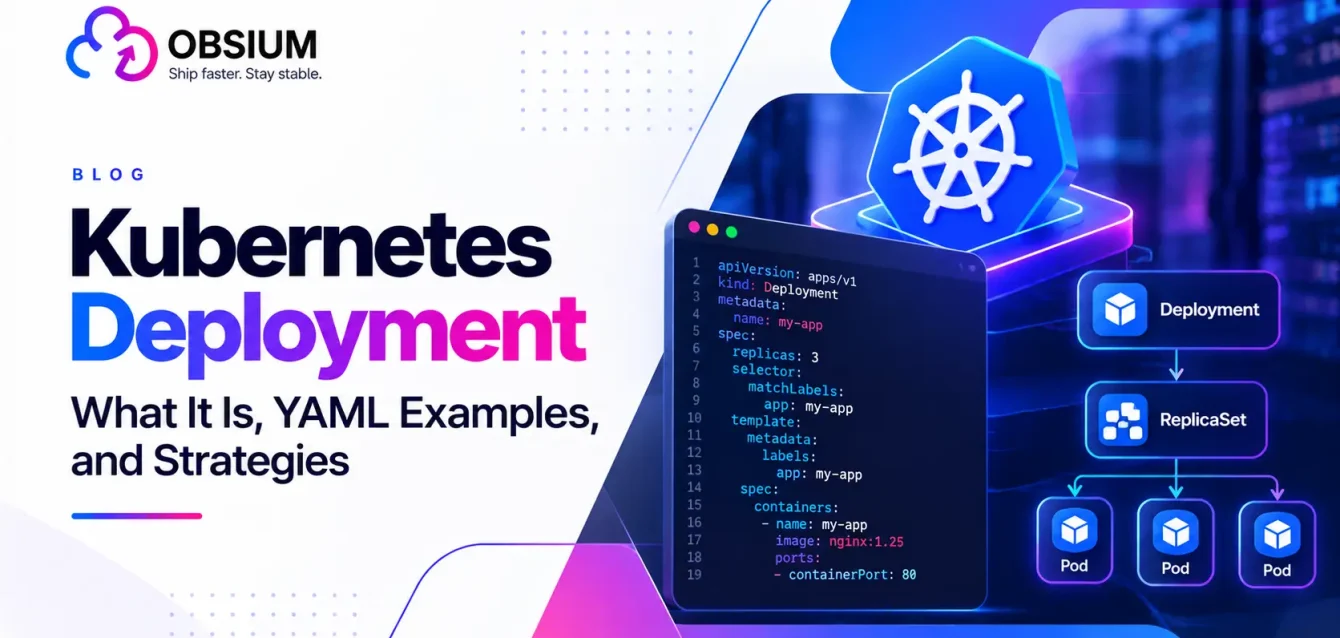
Three Kubernetes resources are central to this process:
- Deployment: Defines the desired application state and manages updates.
- ReplicaSet: Maintains the specified number of Pod replicas.
- Pod: Runs one or more containers that make up an application instance.
The relationship looks like this:
               Kubernetes Deployment
               Desired replicas: 3
                       |
                       v
                    ReplicaSet
                       |
               +-------+-------+
               |       |       |
               v       v       v
             Pod 1   Pod 2   Pod 3
               |       |       |
            App      App      App
When you create a Deployment, the Deployment controller creates a ReplicaSet. That ReplicaSet manages the Pods needed to satisfy the replica count.
If you change the application’s Pod template, such as updating its container image, the Deployment typically creates a new ReplicaSet and coordinates the transition from the old Pods to the new ones.
This separation lets Kubernetes handle updates and recovery without engineers managing each Pod individually.
If you’re new to container orchestration, our Kubernetes resource hub covers the background.
Why Use Kubernetes Deployments?
The main benefit of a Deployment is that it takes repetitive application-management work away from engineers.
Its value shows most when applications need frequent updates or have to stay available under changing conditions.
Automatic recovery from Pod failures
When a Pod crashes or disappears, the ReplicaSet works to replace it. If a container crashes inside a Pod, the kubelet can also restart that container according to its restart policy.
This reduces the need for manual intervention, although it doesn’t eliminate the need to investigate recurring failures.
Rolling updates with minimal disruption
Deployments can gradually replace existing application Pods with new versions.
Rather than stopping every running instance before starting the updated application, Kubernetes can bring new Pods online while older ones continue serving traffic.
With sufficient capacity, healthy application behavior, and appropriate readiness checks, this can enable updates without service downtime.
Easier rollbacks
If an update introduces a problem, a Deployment can be rolled back to an earlier Pod template revision.
That provides a faster recovery path than manually reconstructing the previous configuration, although rolling back application code does not automatically reverse database changes or other external dependencies.
Flexible scaling
Deployments make it possible to increase or decrease the number of application replicas through a configuration change or command.
They can also work with the Horizontal Pod Autoscaler (HPA), which adjusts replica counts based on metrics such as CPU utilization.
Scheduling across nodes
Pods managed by a Deployment can run on different eligible nodes in a Kubernetes cluster.
Kubernetes schedules them based on available resources, placement rules, and other constraints. This helps applications recover from individual node failures, provided the cluster has enough remaining capacity.
When should you use a Deployment?
Deployments are generally the right choice for stateless applications, including web frontends, REST APIs, and many background-processing services.
Applications that depend on stable Pod identities, ordered startup, or dedicated persistent storage may be better suited to StatefulSets.
Kubernetes Deployment vs. Pod, ReplicaSet, StatefulSet, and DaemonSet
One source of confusion for engineers learning Kubernetes is that several workload resources appear to solve similar problems.
They all manage containers in some way, but they operate at different levels.
| Resource | Primary purpose | Best suited for |
|---|---|---|
| Pod | Runs one or more containers | Individual application instances and debugging |
| ReplicaSet | Maintains a specified number of Pods | Replica management, usually through a Deployment |
| Deployment | Manages stateless workloads, replicas, and updates | Web apps, APIs, stateless services |
| StatefulSet | Manages Pods with stable identities and storage relationships | Databases and stateful workloads |
| DaemonSet | Runs a Pod on each eligible node | Logging agents, monitoring agents, node services |
Kubernetes Deployment vs. Pod
A Pod is the smallest deployable compute unit in Kubernetes. It provides the environment in which containers run.
A Deployment operates at a higher level.
It manages multiple Pods through ReplicaSets, maintains the desired replica count, and controls application updates.
Creating a standalone Pod might be sufficient for a temporary experiment. For an application that needs to remain available and receive regular updates, a Deployment is usually more appropriate.
Kubernetes Deployment vs. StatefulSet
The main difference is how Kubernetes treats individual Pods.
Pods in a Deployment are largely interchangeable. If one disappears, another can replace it without needing the same identity.
StatefulSets are designed for workloads where individual Pod identities and storage associations matter. They provide stable network identities, predictable naming, and support for persistent storage associated with each replica.
That distinction becomes important when operating databases, distributed storage systems, or applications that rely on stable members.
For a broader comparison of application packaging and orchestration, see Kubernetes vs. Docker.
How Deployments, ReplicaSets, Pods, and Services Work Together
A Deployment manages the application workload, but it doesn’t provide a stable network endpoint for clients to access the application.
A Kubernetes Service fills that gap.
Pods can be created, terminated, and replaced during updates. Their IP addresses can change as a result.
A Service provides a consistent way to reach eligible Pods using labels and selectors. For a closer look at how traffic moves inside a cluster, see Kubernetes networking explained.
           Users / Other Applications
                      |
                      v
               Kubernetes Service
                      |
              Routes traffic to
                 ready Pods
                      |
           +----------+----------+
           |          |          |
           v          v          v
         Pod 1      Pod 2      Pod 3
           ^          ^          ^
           |          |          |
           +----------+----------+
                      |
                   ReplicaSet
                      ^
                      |
                  Deployment
The Deployment manages the lifecycle of the application Pods. The ReplicaSet maintains their desired number, while the Service provides a stable access point and routes traffic to the selected ready endpoints.
These resources have different responsibilities, but they work together to keep an application accessible while its underlying Pods change.
Kubernetes Deployment YAML Explained
Kubernetes configurations are commonly written in YAML, a human-readable format used to represent structured configuration data.
A Kubernetes Deployment YAML file tells Kubernetes what application to run, how many replicas it needs, and how those Pods should be configured.
Let’s start with a minimal example.
Kubernetes Deployment Example 1: A Basic NGINX Deployment
apiVersion: apps/v1
kind: Deployment
metadata:
  name: nginx-deployment

spec:
  replicas: 3

  selector:
    matchLabels:
      app: nginx

  template:
    metadata:
      labels:
        app: nginx

    spec:
      containers:
        - name: nginx
          image: nginx:1.27.5
          ports:
            - containerPort: 80
This configuration creates a Deployment called nginx-deployment and requests three replicas running the specified NGINX image.
Save it as deployment.yaml and apply it:
kubectl apply -f deployment.yaml
To check whether the Deployment was created:
kubectl get deployments
You can also inspect the Pods:
kubectl get pods -l app=nginx
Assuming the image is available and the cluster has sufficient resources, Kubernetes will create the required Pods.
Understanding the main YAML fields
| Field | What it controls |
|---|---|
apiVersion | The Kubernetes API version used by the resource |
kind | The resource type, in this case Deployment |
metadata.name | The Deployment’s name |
replicas | The desired number of Pod replicas |
selector | The labels used to identify Pods belonging to the Deployment |
template | The configuration used to create Pods |
containers | The container images, ports, and other container settings |
Two details matter here.
First, the labels in spec.selector.matchLabels must match the labels in spec.template.metadata.labels. If they don’t, Kubernetes will reject the Deployment configuration.
Second, a Deployment’s selector is immutable in apps/v1. Once created, you cannot change it through a normal update. Changing the selector generally requires replacing the Deployment, which needs careful planning.
You may also notice a label called pod-template-hash on Pods created by Deployments. Kubernetes uses this label to distinguish ReplicaSets associated with different Pod templates. It should not be manually added or modified.
Kubernetes Deployment YAML Example 2: Resources, Update Strategy, and Health Checks
A minimal configuration helps demonstrate the basics, but production workloads generally need additional controls.
Here’s a more practical example:
apiVersion: apps/v1
kind: Deployment
metadata:
  name: web-app

spec:
  replicas: 3
  revisionHistoryLimit: 5
  minReadySeconds: 10
  progressDeadlineSeconds: 300

  selector:
    matchLabels:
      app: web-app

  strategy:
    type: RollingUpdate
    rollingUpdate:
      maxSurge: 1
      maxUnavailable: 0

  template:
    metadata:
      labels:
        app: web-app

    spec:
      containers:
        - name: web-app
          image: myregistry.example.com/web-app:1.2.0

          ports:
            - containerPort: 8080

          resources:
            requests:
              cpu: "250m"
              memory: "256Mi"
            limits:
              cpu: "500m"
              memory: "512Mi"

          readinessProbe:
            httpGet:
              path: /ready
              port: 8080
            initialDelaySeconds: 5
            periodSeconds: 10

          livenessProbe:
            httpGet:
              path: /health
              port: 8080
            initialDelaySeconds: 15
            periodSeconds: 20
This example adds several controls that matter when running real applications.
Resource requests and limits: Requests help Kubernetes decide where a Pod can be scheduled. Limits restrict resource consumption. CPU limits can introduce throttling, while exceeding a memory limit can result in container termination, so these values should reflect actual workload behavior.
Readiness probe: Checks whether the application is ready to accept traffic. A Pod that fails its readiness probe is generally removed from matching Service endpoints until it becomes ready again.
Liveness probe: Helps Kubernetes identify containers that need restarting because they are no longer healthy.
Rolling update strategy: Controls how Kubernetes replaces Pods during an update.
Revision history: Retains a limited number of older ReplicaSets for rollback purposes.
The /ready and /health endpoints in this example must exist in the application. Copying the YAML without implementing those endpoints would cause health-check failures.
For applications with slow initialization, a startup probe may also be useful to prevent liveness checks from restarting a container before it has finished starting.
Kubernetes Deployment Strategies: Which Approach Should You Use?
Not every application should be updated in the same way.
A customer-facing API handling thousands of requests has different release requirements from an internal reporting service that runs once a day.
Kubernetes deployment strategies determine how a new application version replaces an existing one, how users are affected during the transition, and how easily teams can recover if something fails.
Kubernetes Deployments natively support two update strategies: RollingUpdate and Recreate.
Other approaches, including blue/green and canary deployments, can be implemented using multiple Deployments, Services, ingress or gateway routing, and progressive delivery tools.
1. Kubernetes Rolling Update: Gradually Replace Existing Pods
A Kubernetes rolling update replaces application Pods in stages rather than all at once.
Suppose an application has four replicas running version 1.0.
When you update the Deployment to version 2.0, Kubernetes gradually starts new Pods and removes older ones according to the rollout configuration.
This allows some existing Pods to continue serving traffic while newer versions are introduced.
Two parameters control the process:
maxSurge: The maximum number of extra Pods allowed above the desired replica count during an update.maxUnavailable: The maximum number of desired Pods that may be unavailable during the update.
For example:
strategy:
  type: RollingUpdate
  rollingUpdate:
    maxSurge: 1
    maxUnavailable: 0
With four desired replicas, this configuration allows Kubernetes to temporarily create a fifth Pod while aiming to maintain at least four available replicas during the rollout.
Both settings can use absolute numbers or percentages. By default, Kubernetes uses 25% for each, rounding percentages up for maxSurge and down for maxUnavailable.
When to use it: Rolling updates are a strong default for stateless applications that need frequent releases and should remain available.
The challenge: Old and new versions may run simultaneously. Applications must tolerate that overlap, including backward-compatible API contracts and database migrations. A rolling update also cannot guarantee zero downtime if the application is incorrectly configured or the cluster lacks resources.
2. Recreate: Stop the Old Version Before Starting the New One
The Recreate strategy takes a simpler approach.
Kubernetes terminates existing application Pods before starting replacements using the new Pod template.
strategy:
  type: Recreate
This avoids running old and new application versions simultaneously.
However, it also creates a period when the Deployment has no available application Pods.
When to use it: Recreate can be suitable for internal applications that tolerate downtime or workloads where different application versions must not overlap.
The challenge: Downtime is expected. How long it lasts depends on termination time, image downloads, application startup, and readiness checks.
For most customer-facing services, this trade-off is difficult to justify.
3. Kubernetes Blue/Green Deployment: Keep Two Versions Ready
A Kubernetes blue green deployment uses two separate application environments.
The blue environment runs the current production version. The green environment runs the new version.
Once the green environment has passed testing, traffic is switched from blue to green, often by changing Service selectors or routing configuration.
If the new version has a problem, traffic can be switched back.
When to use it: Blue/green deployments work well for applications where rapid traffic rollback and pre-release validation are important.
The challenge: Maintaining two environments requires additional compute capacity. Traffic switching must also account for existing connections, database compatibility, and any state held outside the Pods.
Although the approach is commonly used with Kubernetes, it is not a separate native Deployment strategy.
4. Kubernetes Canary Deployment: Release to a Small Group First
A Kubernetes canary deployment introduces a new version to a limited portion of production traffic before expanding the rollout.
For example, a team might initially direct 5% of requests to a new version while the remaining 95% continue using the stable version.
If error rates, latency, and other important metrics remain within acceptable ranges, traffic to the canary can gradually increase.
This provides a way to validate changes under real production conditions without immediately exposing every user.
When to use it: Canary deployments are useful for high-traffic applications, frequent releases, and changes where unexpected behavior could have a significant business impact.
The challenge: Teams need reliable monitoring and a mechanism for controlling traffic distribution. Simply running one new Pod alongside nine old Pods does not guarantee an exact 10% traffic split.
Tools such as Argo Rollouts, Flagger, and service meshes can help manage progressive delivery.
5. Shadow Deployments and A/B Testing
Two other approaches are worth knowing about.
Shadow deployment sends a copy of production traffic to a new application version without using its responses to serve real users.
This can help teams test application behavior under realistic traffic conditions. It is useful for infrastructure migrations or performance testing.
The main challenges are additional resource consumption, preventing duplicate side effects, and handling sensitive production data appropriately.
A/B testing directs different user groups to different application versions to measure behavior or outcomes.
Unlike canary deployments, which primarily focus on release safety, A/B testing usually aims to answer a product question: Does the new experience improve conversion, engagement, or another business metric?
It requires consistent user assignment, appropriate measurement, and often feature-management tooling.
Kubernetes Deployment Strategies Compared
| Strategy | Downtime | Release risk | Rollback speed | Additional infrastructure cost |
|---|---|---|---|---|
| Rolling update | Usually avoidable | Moderate | Fast, but requires another rollout | Low to moderate |
| Recreate | Expected | Higher availability impact | Requires application restart | Low |
| Blue/green | Usually avoidable | Lower at cutover, if validated | Potentially very fast | High |
| Canary | Usually avoidable | Limited initial exposure | Fast with automated traffic controls | Moderate |
| Shadow | No user-facing cutover | Low direct user exposure | Not applicable until promoted | Moderate to high |
| A/B testing | Usually avoidable | Depends on experiment | Fast with traffic or feature controls | Variable |
These are typical characteristics, not guarantees. Actual downtime and rollback speed depend on application design, database compatibility, traffic management, and cluster capacity.
Where Do Feature Flags Fit In?
Deployment strategies control which application version runs and who receives traffic from it.
Feature flags control whether particular functionality is enabled within a running version.
Using both gives engineering teams more flexibility. For instance, a team can deploy new code to production but keep a risky feature disabled until it has completed additional testing.
A feature flag can also be switched off without rolling back the entire application, provided the flag system and application are designed to support that behavior.
How to Update, Roll Back, and Scale a Kubernetes Deployment
Once a Deployment is running, most day-to-day management involves updating versions, checking rollouts, or adjusting replica counts.
Kubernetes provides kubectl commands for each of these tasks.
Update a Deployment
One way to update an application is to change its container image:
kubectl set image deployment/web-app \
  web-app=myregistry.example.com/web-app:1.3.0
This modifies the Pod template and triggers a new rollout.
Alternatively, update the image version in the YAML file and reapply the manifest:
kubectl apply -f deployment.yaml
For production systems managed through GitOps, updating the manifest in version control is generally preferable to making untracked live changes.
Check Rollout Status
After applying an update, check its progress:
kubectl rollout status deployment/web-app
You can view revision history with:
kubectl rollout history deployment/web-app
For a specific revision:
kubectl rollout history deployment/web-app \
  --revision=2
This helps identify which Deployment revisions are available for rollback.
Roll Back a Deployment
If a release causes problems, revert to the previous revision:
kubectl rollout undo deployment/web-app
To roll back to a particular revision:
kubectl rollout undo deployment/web-app \
  --to-revision=2
Kubernetes will initiate another rollout using the earlier Pod template.
Keep in mind that a Deployment rollback restores Pod-template configuration, not the complete application environment. Database schema changes, persistent data, external configurations, and downstream dependencies may need separate recovery procedures. Our guide to Kubernetes backup and disaster recovery covers what to protect and how.
Scale a Deployment with kubectl
To manually increase the number of replicas, use the kubectl scale deployment command:
kubectl scale deployment/web-app --replicas=5
Kubernetes will work toward running five replicas.
To reduce the replica count:
kubectl scale deployment/web-app --replicas=2
Manual scaling is useful when traffic changes are predictable or engineers need to adjust capacity during testing.
However, it requires someone or something external to decide when scaling should happen.
Automate Scaling with Kubernetes Horizontal Pod Autoscaler
The Kubernetes Horizontal Pod Autoscaler adjusts replica counts based on observed metrics.
For example, the following configuration targets an average CPU utilization of 60%:
apiVersion: autoscaling/v2
kind: HorizontalPodAutoscaler
metadata:
  name: web-app-hpa

spec:
  scaleTargetRef:
    apiVersion: apps/v1
    kind: Deployment
    name: web-app

  minReplicas: 2
  maxReplicas: 10

  metrics:
    - type: Resource
      resource:
        name: cpu
        target:
          type: Utilization
          averageUtilization: 60
With this configuration, the HPA can adjust the Deployment between two and ten replicas based on CPU utilization relative to requested CPU.
It requires a working metrics pipeline, typically Metrics Server for CPU and memory metrics, and appropriate resource requests.
HPA also depends on enough cluster capacity to schedule additional Pods.
You can inspect its status using:
kubectl get hpa
Avoid repeatedly changing the replica count manually while an HPA is managing the same Deployment. Doing so can create conflicts with the autoscaler’s decisions.
Pause and Resume a Rollout
Kubernetes also allows engineers to pause a Deployment rollout while making configuration changes.
kubectl rollout pause deployment/web-app
After updating the Pod template, resume the rollout:
kubectl rollout resume deployment/web-app
Pausing can help group multiple Pod-template changes into one revision.
It does not act as a reliable emergency stop for terminating running Pods or undoing changes that have already happened.
Control Rollback History
The revisionHistoryLimit field determines how many old ReplicaSets Kubernetes retains for potential rollback.
For example:
spec:
  revisionHistoryLimit: 5
This sets a limit of five old ReplicaSets.
Reducing unnecessary revision history can simplify resource management, but setting the limit too low reduces the number of previous configurations available for rollback.
Kubernetes Deployment Status and Failed Rollouts
A Deployment being created successfully doesn’t necessarily mean the application is healthy.
Pods may fail to start, remain unready, or encounter problems after receiving traffic.
That’s why rollout monitoring matters.
How to Check Deployment Status
Start with these three commands:
kubectl get deployments
kubectl get rs
kubectl get pods
The Deployment output includes information such as desired and ready replica counts.
For more context:
kubectl describe deployment web-app
And for details about an individual Pod:
kubectl describe pod <pod-name>
To investigate application failures:
kubectl logs <pod-name>
These commands help determine whether a problem is related to scheduling, container startup, application health, or the rollout itself.
Understanding Deployment Conditions
Kubernetes reports several conditions associated with Deployment progress.
Progressing: Indicates whether a Deployment is making progress, such as creating or scaling ReplicaSets or making new Pods available.
A completed rollout can also have a successful Progressing condition.
Available: Indicates whether the Deployment has the minimum required number of available replicas.
ReplicaFailure: Reports problems creating or deleting replicas, such as failures caused by insufficient permissions or resource quotas.
A Deployment may still be reported as progressing even when some Pods are temporarily unavailable.
If progress stops for too long, Kubernetes can mark the rollout as failed.
progressDeadlineSeconds and minReadySeconds
Two fields are useful when diagnosing slow or failed rollouts.
progressDeadlineSeconds defines how long Kubernetes allows a Deployment to go without making progress before reporting a failure.
The default is 600 seconds.
progressDeadlineSeconds: 300
If the Deployment exceeds the deadline without sufficient progress, Kubernetes reports a condition with the reason ProgressDeadlineExceeded.
Kubernetes does not automatically roll back a Deployment just because this deadline is exceeded.
minReadySeconds defines how long a newly created Pod must remain ready without a container crash before Kubernetes considers it available.
minReadySeconds: 10
This helps avoid counting a Pod as fully available the moment its readiness check briefly succeeds.
If both fields are configured, progressDeadlineSeconds must be greater than minReadySeconds.
Common Kubernetes Deployment Problems
| Problem | What it usually indicates | What to check |
|---|---|---|
ImagePullBackOff | Kubernetes cannot retrieve the container image | Image name, tag, registry access, pull secrets |
CrashLoopBackOff | A container repeatedly starts and crashes | Application logs, commands, environment variables, probes |
Pending Pods | Pods cannot be scheduled or admitted | Node capacity, taints, affinity, quotas, storage |
ProgressDeadlineExceeded | The rollout has stopped making sufficient progress | Pod events, readiness, image pulls, resource limits |
FailedCreate | Kubernetes cannot create the required Pods | ResourceQuota, admission policies, permissions, configuration |
| Pods running but not ready | The application fails readiness checks | Probe endpoints, dependencies, application startup |
Other problems can be more subtle.
A Pod may be running successfully but experience high latency because another workload on the same node is consuming substantial CPU or I/O resources. This is commonly described as a noisy neighbor problem.
Likewise, a rolling update may stall when the cluster doesn’t have enough spare capacity to schedule additional Pods allowed by maxSurge.
Even a rollout that finishes successfully can cause user-facing downtime if traffic reaches Pods before the application is ready, or if existing connections aren’t handled properly during shutdown.
For production clusters, deployment troubleshooting becomes much easier when metrics, logs, traces, and Kubernetes events can be correlated.
Our Kubernetes observability guide explores how to build that visibility. And if your alerts fire constantly but still miss real failures, see why your Kubernetes alerts are useless and how to fix them.
How to Expose a Kubernetes Deployment
Creating a Deployment starts an application, but it doesn’t automatically make that application accessible outside the cluster.
Kubernetes Services and routing resources handle network access.
The appropriate option depends on whether the application is internal, publicly accessible, or exposed through a shared gateway.
| Networking option | Purpose | Typical use |
|---|---|---|
| ClusterIP | Exposes a Service inside the cluster | Internal APIs and microservices |
| NodePort | Exposes a Service through a port on cluster nodes | Testing and specific networking environments |
| LoadBalancer | Requests an external load balancer where supported | Public-facing network services |
| Ingress | Routes HTTP/HTTPS traffic to Services | Host-based and path-based application routing |
Example: Exposing a Deployment with a Service
The following Service targets Pods labeled app: web-app:
apiVersion: v1
kind: Service
metadata:
  name: web-app-service

spec:
  type: ClusterIP

  selector:
    app: web-app

  ports:
    - port: 80
      targetPort: 8080
The Service listens on port 80 and forwards traffic to port 8080 on eligible Pods.
Because it uses ClusterIP, the Service is accessible within the cluster rather than directly through a public endpoint.
Example: Routing External Traffic with Ingress
For an HTTP application, an Ingress can route external requests to the Service:
apiVersion: networking.k8s.io/v1
kind: Ingress
metadata:
  name: web-app-ingress

spec:
  ingressClassName: nginx

  rules:
    - host: app.example.com
      http:
        paths:
          - path: /
            pathType: Prefix
            backend:
              service:
                name: web-app-service
                port:
                  number: 80
In this example, requests to app.example.com are routed to web-app-service.
The configuration assumes an appropriate Ingress controller and IngressClass are installed. The hostname must also resolve to the controller’s external endpoint.
Ingress resources alone do not create a functioning external route without a controller.
For new architectures, the Kubernetes project recommends considering the Gateway API, as the Ingress API is stable but no longer being actively extended.
Kubernetes Deployments in CI/CD and GitOps
Managing Deployments manually becomes increasingly difficult when teams operate multiple applications, environments, and clusters.
CI/CD and GitOps help here.
A typical continuous delivery workflow looks like this:
         Developer commits code
                  |
                  v
           CI pipeline runs
                  |
         Tests and security scans
                  |
                  v
         Container image is built
                  |
                  v
         Image pushed to registry
                  |
                  v
       Deployment manifest updated
                  |
                  v
          Kubernetes rollout
                  |
                  v
        Health and metric checks
In a conventional CI/CD setup, a pipeline can execute deployment commands after successfully building and testing an application.
In a GitOps model, Git contains the desired application configuration, and a controller continuously reconciles the cluster with that configuration.
Two widely used GitOps tools are Argo CD and Flux.
Both help teams manage declarative Kubernetes configurations and detect differences between the desired and actual cluster states.
The main advantage is consistency.
Rather than relying on engineers to remember which changes were applied in which environments, teams can review configuration updates, track them through version control, and use automated reconciliation.
For a closer comparison of these approaches, see GitOps vs. DevOps. Infrastructure provisioning usually sits alongside this workflow, and tools like Terraform handle that layer. If you’re weighing the two, read Terraform vs. Kubernetes.
Kubernetes Deployment Best Practices for Production
A Deployment can be technically valid and still perform poorly in production.
Reliable application delivery depends on decisions about resources, rollout behavior, security, and observability.
The following practices are worth establishing early.
Set Realistic Resource Requests and Limits
Resource requests influence scheduling and help Kubernetes allocate workloads appropriately.
Memory limits can protect nodes from excessive consumption, while overly restrictive CPU limits may introduce throttling.
Start with measurements rather than arbitrary values, then adjust configurations based on observed demand.
Regular resource reviews can also uncover opportunities for Kubernetes cost optimization.
Use Readiness, Liveness, and Startup Probes Appropriately
Not every failed health check should trigger a restart.
Readiness probes determine whether an application should receive traffic. Liveness probes identify containers that need restarting. Startup probes give slow-starting applications additional time before liveness and readiness checks begin.
Design these probes around the application’s behavior rather than using the same endpoint for every purpose.
Choose an Update Strategy That Matches the Application
Rolling updates are appropriate for many stateless services, but they aren’t universally the safest choice.
Consider how the application handles concurrent versions, long-running requests, database migrations, and background jobs.
For higher-risk releases, progressive delivery or blue/green deployments may provide stronger control over exposure.
Use PodDisruptionBudgets Where Appropriate
A PodDisruptionBudget (PDB) helps limit how many Pods can be voluntarily disrupted at once during operations such as node draining.
For instance, a PDB can help prevent too many replicas of a critical service from being evicted simultaneously during planned maintenance.
However, a PDB is not a replacement for a sound Deployment update strategy. Deployment rolling updates are governed by their own rollout settings, and PDBs do not prevent every type of disruption.
Pin Container Images to Known Versions
Avoid relying on floating image tags such as latest for production releases.
Versioned tags make it easier to identify which application version is intended to run.
For stronger reproducibility, pin images by immutable digest. This avoids situations where a tag points to different image contents over time.
Also ensure your image registry, build pipeline, and deployment process support traceability.
Build Security into the Deployment Process
Security belongs in the deployment process from the start.
Useful controls include running containers as non-root where possible, restricting unnecessary privileges, limiting service-account permissions, scanning images, and using appropriate network policies.
Secrets should be managed through suitable secret-management mechanisms rather than embedded directly in application manifests.
Our Kubernetes security best practices guide covers these considerations in greater detail. For the pipeline side, see our DevOps security best practices.
Monitor Application Health Beyond Pod Status
A Deployment showing all replicas as ready is encouraging, but it doesn’t prove the application is performing well.
Monitor request latency, error rates, throughput, resource utilization, and restart patterns alongside Deployment availability.
This helps distinguish a successful Kubernetes rollout from a release that is technically healthy but causing a poor user experience.
For more on what to track and how to bring it together, see unified observability for Kubernetes and DevOps metrics that actually matter.
Running Deployments Across Many Clusters
The operational challenge grows when the same application runs across several Kubernetes clusters.
Teams need to manage configuration differences, cluster capacity, policy consistency, release sequencing, and observability across environments.
GitOps and centralized policy management can reduce configuration drift, but rollout coordination still requires planning. A successful deployment in one cluster doesn’t guarantee the same result in another.
Organizations expanding their Kubernetes footprint should establish clear release standards, consistent monitoring, and repeatable recovery procedures.
For more detail, read our guide to multi-cluster Kubernetes management. Our broader Kubernetes management guide covers day-to-day cluster operations.
The right operating model also depends on whether infrastructure responsibilities belong to an internal platform team or a managed service provider. Our comparison of managed Kubernetes vs. self-managed Kubernetes explores that decision.
When to Bring in Kubernetes Help
Kubernetes Deployments simplify application management, but production reliability still depends on the architecture, resource configuration, release process, and visibility surrounding them.
If your team is dealing with repeated rollout failures, unpredictable scaling, excessive infrastructure costs, or operational complexity across clusters, specialist support can help find and fix the underlying problems.
Obsium works with teams on Kubernetes architecture, deployment reliability, performance, and day-to-day operations. If the gaps are in the delivery pipeline or monitoring, our DevOps solutions and observability solutions cover those too.
Explore Obsium’s Kubernetes consulting services to see how we can help.
Frequently Asked Questions About Kubernetes Deployments
What is the difference between a Pod and a Deployment in Kubernetes?
A Pod is the unit that runs containers, while a Deployment manages Pods through ReplicaSets. Deployments maintain the desired replica count and support application updates, scaling, and rollbacks. For long-running stateless applications, using a Deployment is generally more reliable than creating standalone Pods.
Kubernetes Deployment vs. StatefulSet: Which should I use?
Use a Deployment when application replicas are interchangeable and don’t require stable Pod identities. Use a StatefulSet when the application needs predictable Pod names, stable network identities, or persistent storage associated with individual replicas. Web APIs commonly use Deployments, while databases and other stateful systems often benefit from StatefulSets.
What is the default Kubernetes Deployment strategy?
The default strategy is RollingUpdate. Kubernetes gradually replaces old Pods with new ones rather than stopping the entire application first. By default, both maxSurge and maxUnavailable are set to 25%, allowing Kubernetes to balance update speed with application availability.
How do I roll back a Kubernetes Deployment?
Run kubectl rollout undo deployment/<deployment-name> to initiate a rollback to the previous revision. You can inspect available revisions with kubectl rollout history and select a specific revision using --to-revision. Rollbacks restore previous Pod templates but don’t automatically reverse database migrations or external changes.
What do maxSurge and maxUnavailable mean in Kubernetes?
maxSurge controls how many additional Pods Kubernetes can create above the desired replica count during a rolling update. maxUnavailable determines how many desired Pods can be unavailable during that process. Together, they control the trade-off between temporary resource consumption and application availability.
Why is my Kubernetes Deployment stuck?
A Deployment may become stuck because Pods can’t be scheduled, container images can’t be pulled, applications are crashing, or readiness probes are failing. Start with kubectl describe deployment, inspect the affected Pods, and review events and container logs. Resource quotas, insufficient cluster capacity, and configuration errors are also common causes.
Which Kubernetes Deployment metrics should I monitor?
Monitor available and unavailable replicas, rollout progress, Pod restart counts, CPU and memory utilization, and scheduling failures. Application metrics such as request latency, error rates, and throughput are equally important because healthy Pods don’t necessarily mean a healthy application. Monitoring both infrastructure and application behavior provides a more reliable picture.