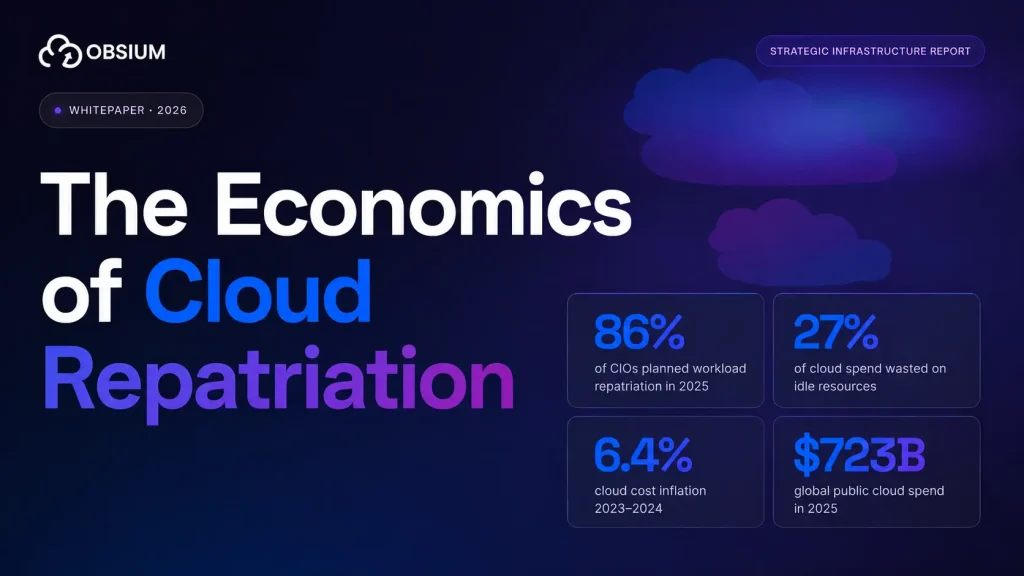


Cloud waste went up in 2026. After five consecutive years of decline, the percentage of cloud spend that organizations waste rose from 27% to 29%, driven by AI workload complexity and teams provisioning GPU capacity they do not fully use (Flexera 2026 State of the Cloud Report).
Harness pegs the total at $44.5 billion in wasted cloud infrastructure spend for 2025 alone (Harness FinOps in Focus 2025).
84% of organizations say managing cloud spend is their top cloud challenge. 63% now have dedicated FinOps teams (Flexera 2025/2026). And yet the waste percentage is going back up. That means the problem is not awareness. It is execution.
Most FinOps best practices articles give you a list: rightsize instances, buy reserved capacity, tag your resources, and set budgets. That advice is correct and also useless if your team cannot see what is actually running, how much each workload consumes, and where the gap is between what you provisioned and what you use. This post covers what moves the number, with data on what saves how much.
Why most cloud cost optimization fails
The FinOps Foundation has 96,000+ members across 15,000+ companies, including 93 of the Fortune 50 (FinOps Foundation). The practices are well documented. The tools exist. So why does waste keep climbing?
The Harness FinOps in Focus report (2025) surveyed 700 practitioners and found the adoption gap:
- 58% of organizations do not use reserved instances or savings plans
- 61% do not rightsize instances
- 71% do not use spot instance orchestration
- 48% do not track or shut down idle resources
Those are not obscure techniques. Reserved instances have been available since 2009. Rightsizing is the single most commonly recommended FinOps practice. The problem is that knowing what to do and actually doing it consistently are different problems. The second one requires tooling, automation, and visibility that most teams do not have.
“We looked at more than $3 billion in cloud spending across organizations and industries and found that most organizations had additional untapped cost savings of 10 to 20 percent.” — McKinsey Digital (Everything is better as code: Using FinOps to manage cloud costs)
The maturity problem
The FinOps Foundation uses a Crawl-Walk-Run maturity model.
Here is where most organizations sit:
- 34% at Crawl (reactive, spreadsheet-based, minimal automation)
- 51% at Walk (some automation, dedicated team, regular reviews)
- 14% at Run (automated optimization, real-time visibility, engineering-integrated)
The Foundation itself notes that almost nobody achieves Run maturity across all FinOps capabilities (FinOps Foundation: There Are No Runners). Most organizations are Walk-stage: they have a FinOps team, they review costs monthly, and they produce reports. What they lack is the feedback loop from infrastructure metrics to cost decisions.
The difference between Walk and Run is automation and observability. Walk-stage teams look at billing dashboards after the money is spent. Run-stage teams have alerts firing when a workload exceeds its cost baseline in real time.
What actually saves money
Not all optimization levers are equal. Here is what the data says about each one, ranked by impact:
| Optimization | Typical savings | Adoption rate | Source |
|---|---|---|---|
| Reserved instances / savings plans | 40-72% off on-demand pricing | 42% of organizations | FinOps Foundation |
| Spot instances (mixed with on-demand) | 59% compute cost reduction | 29% of organizations | CAST AI 2025 |
| Rightsizing instances | 36% cost reduction | 39% of organizations | AWS Enterprise Strategy |
| Eliminating idle resources | 10-15% of monthly bill | 52% of organizations | Data Stack Hub |
| Orphaned storage cleanup | 3-6% of total spend | Not widely tracked | Data Stack Hub |
The biggest lever (reserved instances) is also the one that requires the most confidence in your forecasting. You are committing to one or three years of usage. If you over-commit, you pay for capacity you do not use. If you under-commit, you leave savings on the table.
This is where the observability piece matters. You cannot confidently commit to reserved capacity if you do not know your actual utilization patterns over time. A billing dashboard tells you what you spent last month.
A Prometheus time-series database tells you what your CPU and memory utilization looked like, hour by hour, for the last six months. One of those is useful for making a commitment purchase. The other is a receipt.
Kubernetes: where the waste hides
If your workloads run on Kubernetes, this section is probably where most of your waste lives.
Datadog’s State of Cloud Costs report (2024) found that 83% of container costs are associated with idle resources: 54% from cluster-level idle capacity and 29% from workload-level overprovisioning (Datadog). CAST AI’s 2026 benchmark puts average Kubernetes CPU utilization at 8% and memory utilization at 20% (CAST AI). GPU utilization is even worse at 5%.
CPU overprovisioning jumped from 40% to 69% year over year. The pattern is predictable: a developer sets resource requests high during development because they do not want their pods evicted, never comes back to adjust them after the workload stabilizes, and the cluster scales up to accommodate requests that far exceed actual usage.
The CNCF FinOps Microsurvey (2023) confirms this: 70% of respondents cited overprovisioning as the top cause of Kubernetes overspending, 49% said Kubernetes drove their cloud spending up, and only 20% had operationalized FinOps for their K8s workloads (CNCF).
What makes Kubernetes cost optimization hard is that the billing data does not map cleanly to workloads. Your cloud provider charges you for nodes (EC2 instances, GKE nodes, AKS VMs).
Your applications run as pods on those nodes. The gap between node cost and pod-level resource consumption is where the waste lives, and you need container-level metrics to see it.
The observability gap in FinOps
Most FinOps implementations start with billing data. AWS Cost Explorer, Azure Cost Management, GCP Billing. These tools tell you what you spent, broken down by service, account, and region. That is useful for the finance team. It is not useful for the engineer who needs to know why the bill went up 30% last Tuesday.
“The most expensive part is the unseen costs inflicted on your engineering organization as development slows down and tech debt piles up, due to low visibility and thus low confidence.” — Charity Majors, CTO of Honeycomb (The Cost Crisis in Observability Tooling)
The missing layer is resource-level observability: metrics that show what each workload actually consumes, how that consumption changes over time, and where the gap is between provisioned capacity and actual usage.
For Kubernetes workloads, this means:
- CPU and memory requests vs actual usage, per pod. This is the single most actionable metric for cost optimization. If a pod requests 2 CPU cores and uses 0.3 on average, that is 85% waste on that pod’s CPU allocation. Multiply that across hundreds of pods and the numbers get large.
- Namespace-level resource consumption. This is how you do cost allocation by team or service. Without it, you are splitting the cloud bill by account or tag, which misses the container layer entirely.
- Node utilization over time. Are your nodes actually full, or are they running at 30% because pod requests are spread unevenly? Bin-packing efficiency is invisible without node-level metrics.
- Network egress by service. Cross-AZ and cross-region traffic costs add up. Tracing shows you which services are making the expensive calls.
Prometheus with kube-state-metrics and cAdvisor gives you all of this. Grafana turns it into dashboards your team can actually use. The data is already there if you are running Kubernetes. The question is whether anyone is looking at it.
Five practices that actually work
1. Set resource requests based on observed usage, not guesses.
Pull the last 30 days of CPU and memory utilization from Prometheus. Set requests to the P95 of actual usage plus a 20% buffer. Review quarterly. This alone can cut Kubernetes compute costs by 30-40% because it closes the gap between what pods ask for and what they actually use.
2. Build namespace-level cost dashboards.
Assign every workload to a namespace that maps to a team or service. Use Prometheus metrics to calculate the resource consumption per namespace, then multiply by your per-unit cost (node cost divided by allocatable resources). When teams can see their own costs, they start caring about efficiency.
3. Automate commitment management.
Reserved instances and savings plans should not be a once-a-year spreadsheet exercise. Use your utilization data to identify stable baseline workloads (the ones running 24/7 at consistent levels) and cover those with commitments. Use on-demand or spot for everything variable. Review monthly. The savings (40-72% on committed workloads) compound over time.
Tagging sounds boring. It is also the foundation of cost allocation. If your resources are not tagged by team, environment, and service, your billing data is a single number that nobody owns.
Enforce tagging through admission controllers (OPA/Gatekeeper for Kubernetes) or cloud-native policies (AWS SCP, Azure Policy). Block untagged resource creation at deploy time.
4. Alert on cost anomalies instead of waiting for monthly reports.
A cost spike on Tuesday that you discover in next month’s report is three weeks of wasted spend. Set up alerts on daily cost changes exceeding a threshold (10-15% above baseline is a reasonable starting point). Route them to the team that owns the workload. Prometheus recording rules and Grafana alerting can do this without a third-party tool.
What doesn’t work
1. Monthly cost review meetings without workload-level data.
The meeting where finance shows a chart of last month’s total AWS bill, and everyone nods. Nobody can action a top-line number. By the time you get the bill, the money is spent. Replace this with real-time dashboards that show cost by team, service, and environment, and set alerts so the responsible team gets notified when their costs deviate from baseline.
2. Setting resource limits without monitoring actual usage.
Teams sometimes respond to cost pressure by setting aggressive resource limits on Kubernetes pods. If those limits are based on guesses rather than observed usage, you get OOMKilled pods, throttled applications, and outages. Then the limits get removed “temporarily” and never come back.
Two more that come up often: buying reserved instances based on last month’s bill without looking at utilization trends (you risk committing to capacity you are about to rightsize away), and treating FinOps as a finance function rather than an engineering practice.
The engineers who write the Terraform and the Kubernetes manifests are the ones who determine the cloud bill. If they do not have cost visibility in their workflow, the FinOps team is writing reports that nobody reads.
“FinOps is the practice of bringing financial accountability to the variable spend model of cloud, enabling distributed teams to make business trade-offs between speed, cost, and quality.” — J.R. Storment, co-founder of FinOps Foundation (FinOps Foundation)
The real-world impact
Deloitte’s 2025 TMT Predictions report estimates that organizations implementing FinOps practices can cut cloud costs by up to 40%, with $21 billion in projected savings industry-wide (Deloitte). Specific examples: Airbnb saved $63.5 million in cloud costs, and Lyft cut cloud costs per ride by 40% in six months.
Those are large companies with dedicated platform teams. For mid-size organizations, the realistic savings range is 10-20% (the McKinsey estimate from analyzing $3 billion in cloud spending). That is still real money. A company spending $500K/month on cloud that captures 15% through FinOps practices saves $75K monthly, or $900K annually.
The organizations that get the best results share a pattern: they have resource-level visibility (beyond billing data), they give engineering teams access to cost dashboards for their own services, and they automate the repetitive optimizations (commitment purchases, idle resource cleanup, rightsizing recommendations).
The FinOps team sets the governance. The engineering teams make the day-to-day decisions. The observability stack is the connective tissue between the two.
FAQs
What are FinOps best practices?
The core practices are resource rightsizing based on actual utilization data, commitment management (reserved instances and savings plans for stable workloads), tagging governance for cost allocation, idle resource cleanup, and real-time cost anomaly detection.
How much can FinOps save on cloud costs?
It depends on your starting point. McKinsey found 10-20% untapped savings in most organizations they analyzed. Deloitte cites up to 40% for mature implementations. The Flexera State of the Cloud report puts average waste at 29% of total cloud spend, so the theoretical ceiling is high. Realistically, most organizations can capture 15-25% savings in the first year.
What is the biggest source of cloud waste?
For organizations running Kubernetes, overprovisioned containers. Datadog found 83% of container costs are associated with idle resources. For non-containerized workloads, the biggest source is usually a combination of unoptimized instance types (not using reserved capacity or spot instances) and forgotten resources that are running but not serving traffic.
Do I need a dedicated FinOps team?
At smaller scale (under $100K/month in cloud spend), a part-time FinOps role or shared responsibility across engineering and finance works. Beyond that, a dedicated person or team pays for itself quickly. 63% of organizations now have dedicated FinOps teams, up from 51% two years ago.
How does observability help with FinOps?
Billing dashboards tell you what you spent. Observability tells you what you actually used. The gap between the two is waste. Prometheus metrics show CPU and memory utilization per pod, per node, per namespace. Grafana dashboards give teams visibility into their own resource consumption.
Without this data, cost optimization is guesswork. With it, you can rightsize with confidence, spot anomalies in real time, and make informed commitment purchases based on actual utilization trends rather than billing history.