Terraform vs Kubernetes: what each does and how they work together
The confusion is reasonable. Both tools are declarative. Both reconcile actual state against desired state. Both live in the cloud native ecosystem, both get configured in text files checked into Git, and both show up in the same job descriptions.
So people ask which one to use, and that question has no good answer, because it assumes they compete.
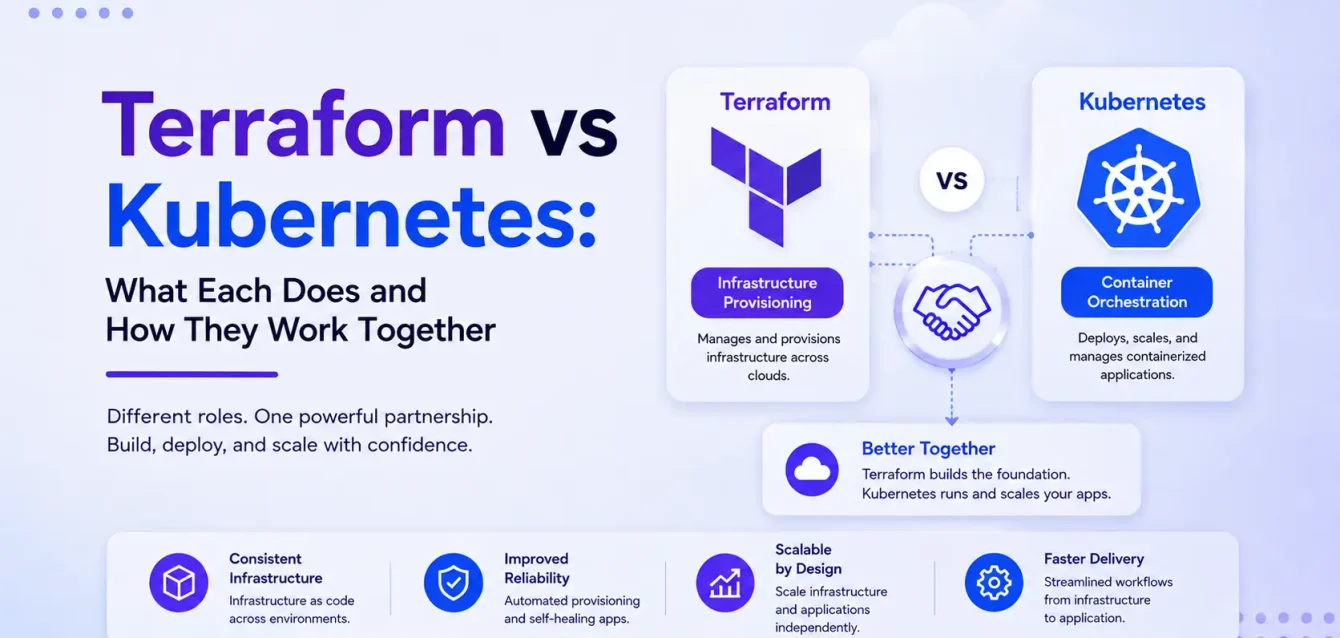
Terraform provisions infrastructure. Kubernetes orchestrates containers running on that infrastructure. Most production teams run both, and 82% of container users now run Kubernetes in production (CNCF 2025 Annual Survey), most of them on clusters that Terraform built.
The question worth your time is different: where exactly does the boundary go? Terraform can manage Kubernetes resources. There’s an official provider for it. Whether it should is where teams argue, where architectures go wrong, and where most articles on this topic stop being useful.
We’ve drawn that boundary on a lot of client clusters, and the same failures recur: a Deployment managed in Terraform fighting an autoscaler over replica counts, a node group Terraform keeps trying to shrink back. The reason the two tools fight comes down to a single design difference — and once you see it, the boundary mostly places itself.
For CTOs and anyone newer to the tools
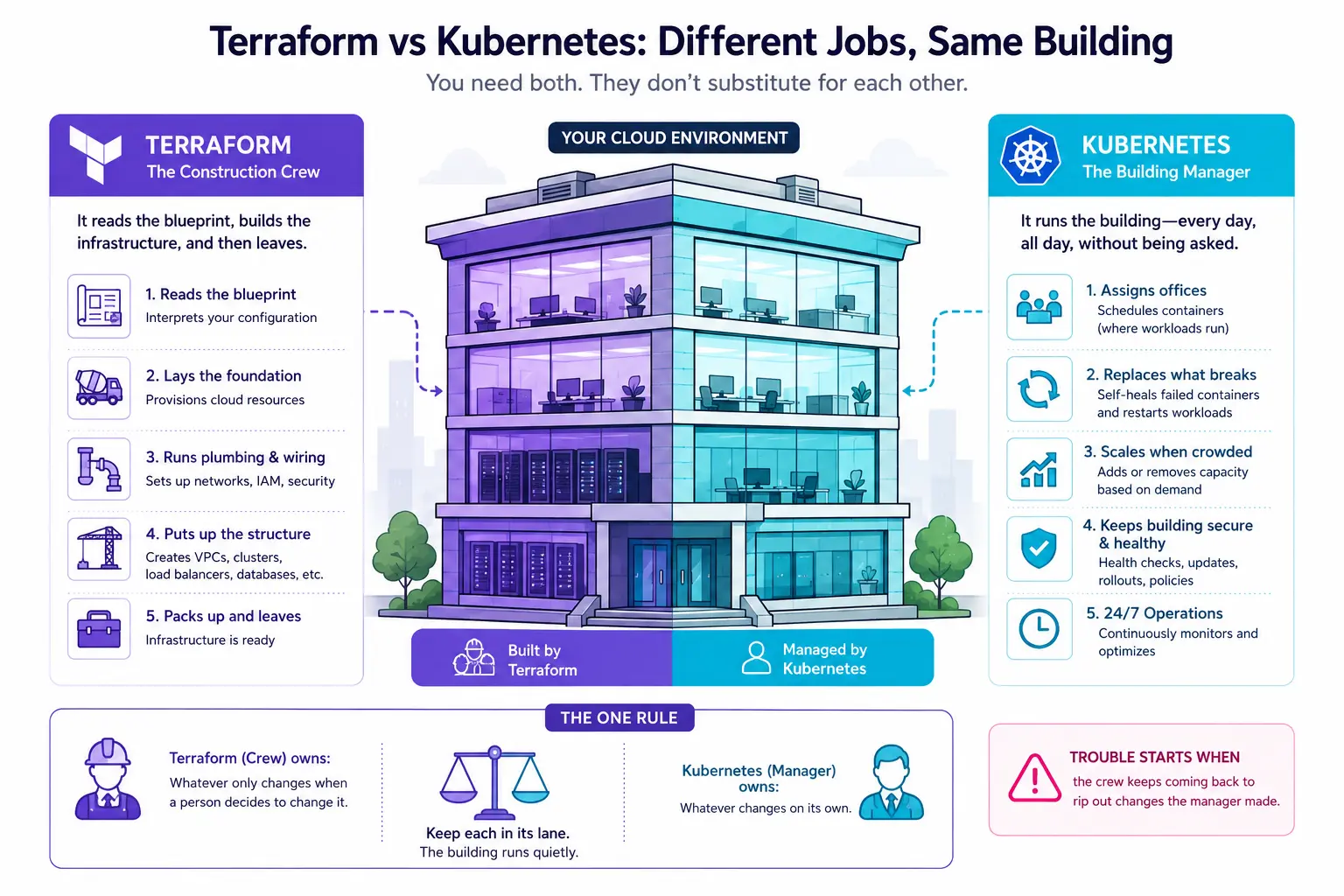
Picture your cloud setup as a building. Terraform is the construction crew: it reads the blueprint, pours the foundation, runs the plumbing and wiring, puts up the structure, then packs up and leaves. Kubernetes is the building manager who takes over once it’s built — assigning offices, replacing anything that breaks, calling for more space when it gets crowded, all day, every day, without being asked.
You need both, and they don’t substitute for each other: a construction crew can’t run a building, and a building manager can’t pour a foundation. Nearly every debate in this article reduces to one rule — the crew (Terraform) owns whatever only changes when a person decides to change it; the manager (Kubernetes) owns whatever changes on its own. Trouble starts when the crew keeps coming back to rip out changes the manager made. Keep each in its lane and the building runs quietly.
The short answer
Terraform
Kubernetes
Job
Create and manage infrastructure
Run and manage containers
Operates on
Cloud APIs (AWS, Azure, GCP, and thousands more)
Containers inside a cluster
Answers
“Does this VPC/database/cluster exist and match spec?”
“Are 5 replicas of this app healthy right now?”
Runs
On demand, in a pipeline
Continuously, forever
Config
HCL
YAML
Terraform builds the cluster. Kubernetes runs things inside it. If you’re deciding between them, you’ve likely got a question that needs both.
What is Terraform?
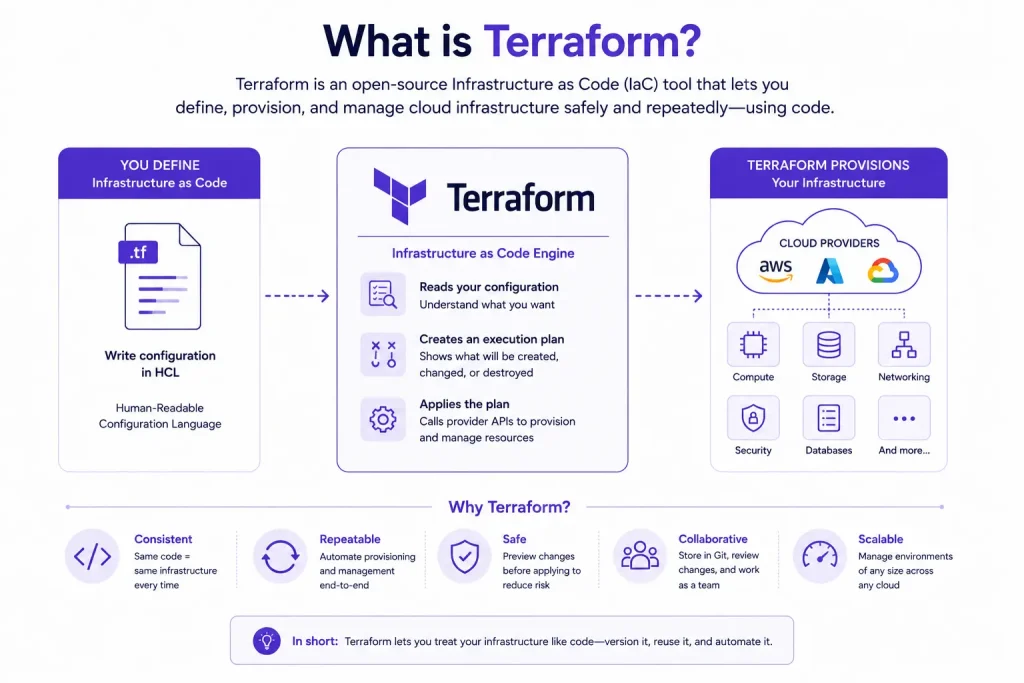
Terraform is an infrastructure as code tool from HashiCorp that provisions and manages infrastructure through declarative configuration files.
You describe the infrastructure you want in HCL (HashiCorp Configuration Language). Terraform figures out what needs creating, changing, or destroying to get there, then does it through provider APIs.
Providers and the multi-cloud story
Providers are plugins that translate Terraform configuration into API calls. The public registry lists over 6,900, though only around 430 are official or partner-maintained and the rest vary wildly in quality. The ones you’ll actually use cover AWS, Azure, GCP, and the usual suspects — Cloudflare, Datadog, GitHub, PagerDuty, and Kubernetes itself.
One caveat on “multi-cloud” claims: Terraform gives you one workflow and one language across providers. It does not give you portable configuration. An aws_instance doesn’t become an azurerm_virtual_machine because you changed a provider block. You still write cloud-specific resources; you just write them the same way.
State management, the part that bites people
Terraform keeps a state file mapping your configuration to real-world resources. It’s how Terraform knows that aws_vpc.main in your code corresponds to vpc-0a1b2c3d in your account.
State is the source of most Terraform incidents:
Local state means one person’s laptop holds the truth. When they leave, or their disk dies, you’re reconstructing infrastructure by hand.
No locking means two engineers running apply simultaneously corrupt state and can destroy resources.
Monolithic state means one file for everything, so a change to a DNS record requires refreshing 800 resources and risks the blast radius of your entire estate.
Secrets in state are stored in plaintext. Database passwords, private keys, generated credentials all land there.
The fixes are well established:
Remote backends (S3 with DynamoDB locking, Terraform Cloud, GCS, Azure Storage) solve the first two.
Splitting state by lifecycle and blast radius solves the third.
Encryption plus restricted access mitigates the fourth.
Warning: If your Terraform state is currently a local file in someone’s home directory, fix that before reading the rest of this article. It’s the highest-severity, lowest-effort infrastructure risk most teams carry.
The workflow
Three steps, and the middle one is the reason people trust Terraform:
Write — describe desired infrastructure in HCL
Plan — terraform plan shows exactly what will change before anything happens
Apply — terraform apply executes the plan
The plan step is Terraform’s real advantage over clicking in a console or running scripts. You see the diff before you commit to it, which makes review possible and makes destructive changes obvious.
Common use cases
Provisioning VPCs, subnets, routing, security groups
Anything with a cloud API and a lifecycle measured in weeks or months
What is Kubernetes?
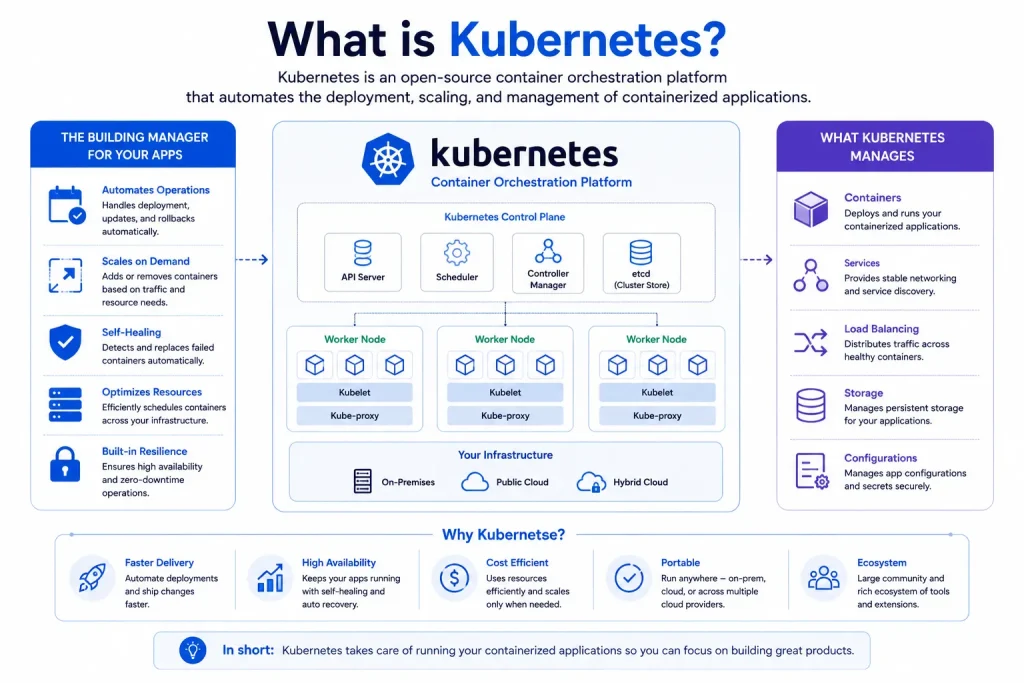
Kubernetes is a container orchestration platform. You declare what should be running — how many replicas, what image, what resources — and Kubernetes continuously works to make reality match.
The reconciliation loop
This is the concept that matters most for understanding the Terraform boundary, so it’s worth being precise.
Kubernetes runs controllers: processes that watch the current state of a resource and take action to move it toward the declared desired state. That loop never stops (Kubernetes controllers documentation).
Declare 5 replicas, and the Deployment controller ensures 5 exist. Kill a pod, and a new one appears within seconds. Drain a node, and pods reschedule elsewhere. Nobody triggered any of that. The loop is always running.
This is what makes Kubernetes self-healing, and it’s also what makes it fight with tools that assume they’re in sole control.
On managed services (EKS, AKS, GKE) the cloud provider runs the control plane. You manage nodes and workloads. That division is exactly why Terraform is useful here: the cluster itself is a cloud resource with an API, which is Terraform’s home territory.
Core objects
Object
What it does
Pod
Smallest deployable unit; one or more containers sharing network and storage
Deployment
Manages ReplicaSets; handles rolling updates and rollbacks
Service
Stable network endpoint and load balancing across pods
Ingress
HTTP/HTTPS routing from outside the cluster
ConfigMap
Non-sensitive configuration
Secret
Sensitive data (base64-encoded, encrypt at rest)
StatefulSet
Workloads needing stable identity and storage
DaemonSet
One pod per node — agents, log shippers, CNI
HorizontalPodAutoscaler
Scales replica count based on metrics
Scheduling, scaling, self-healing
Scheduling: the scheduler places pods based on resource requests, node affinity, taints and tolerations, and topology constraints.
Scaling: horizontally via HPA (more pods), vertically via VPA (bigger pods), or at the infrastructure layer via Cluster Autoscaler or Karpenter (more nodes). Note that node-level scaling touches infrastructure Terraform may also manage — more on that conflict shortly.
Self-healing: failed containers restart, unhealthy pods get replaced, pods on dead nodes reschedule, and readiness probes keep traffic away from pods that aren’t ready.
Common use cases
Running microservices with independent scaling
Zero-downtime rolling deployments
Batch and scheduled jobs
Workloads that need to survive node failure without paging anyone
Multi-tenant platforms with namespace isolation
Anything where you’d otherwise write scripts to restart crashed processes
Creates VPCs, subnets, load balancers, security groups
Manages pod networking, Services, Ingress, NetworkPolicy
Config language
HCL
YAML (or JSON)
Typical users
Platform, infrastructure, cloud engineers
Platform engineers, SREs, application developers
Learning curve
Moderate. Concepts are few; state and modules take time
Steep. Many interacting components and failure modes
Drift handling
Detects at plan time; you decide what to do
Corrects automatically, continuously
Failure model
Apply fails, you fix config and re-run
Controllers retry indefinitely; rollouts can be rolled back
Best for
Anything with a cloud API and a slow lifecycle
Anything containerized with a fast lifecycle
Main advantage
Preview changes before applying; works across every provider
Self-healing and automatic scaling with no human in the loop
Main limitation
No runtime awareness; doesn’t know or care if apps are healthy
Only manages what’s inside the cluster
Where they’re genuinely similar
They genuinely do overlap:
Both are declarative — you describe the end state, not the steps to reach it.
Both reconcile desired state against actual state.
Both are extensible through plugins — providers for Terraform, CRDs and operators for Kubernetes.
Both are open source, backed by large communities, proven at scale, and easy to wire into CI/CD.
Where that similarity misleads people
The similarity is real but shallow, and it’s what causes bad architecture decisions.
The difference is when reconciliation happens. Terraform reconciles when you run it. Kubernetes reconciles constantly, in a loop, whether or not anyone is watching.
That single difference is where most of the trouble comes from, so it’s worth going through carefully.
Why the reconciliation models conflict
In plain terms: our construction crew (Terraform) expects the building to match the blueprint it was handed. Our building manager (Kubernetes) is constantly making changes — moving people around, opening more rooms as demand rises. Tell the crew to keep enforcing the original blueprint and it will keep tearing out the manager’s work, and the two get stuck undoing each other. That’s the entire conflict. Everything below is just the detail of how it plays out.
Here’s the mechanism that most comparisons skip.
Terraform assumes it is the sole author of the resources it manages. Its model is: this config describes reality, and any difference is drift I should correct on the next apply.
Kubernetes assumes nothing is the sole author. Controllers, operators, admission webhooks, the scheduler, and autoscalers all mutate resources continuously and by design. Mutation isn’t an exception in Kubernetes; it’s the operating principle.
Point Terraform at Kubernetes resources and these two assumptions collide.
The HPA trap
HPA — the Horizontal Pod Autoscaler — is Kubernetes’ built-in autoscaler: it adds and removes copies of an app as traffic rises and falls. It’s the building manager calling for more rooms at rush hour. Watch what happens when Terraform also believes it owns that number.
Suppose you manage a Deployment through Terraform:
Terraform wants to scale you back down to 3, in the middle of your traffic spike, because its config says 3. Apply that and you’ve caused an incident. HPA then scales back up, Terraform sees drift again, and the two keep overwriting each other indefinitely.
That works. It’s also a signal. You’ve told Terraform to stop managing part of a resource it nominally owns, which means ownership is split in a way nobody can see from the code.
Phantom drift
The HPA case is the obvious one. Subtler versions appear everywhere:
Admission webhooks inject sidecars, labels, or annotations. Terraform sees fields it didn’t write.
Operators modify the CRs they manage. Terraform sees changes it wants to revert.
Defaulting — the API server populates dozens of fields you never specified.
Cluster autoscaler / Karpenter changes node counts that Terraform’s node group config also declares.
Each of these produces a diff in terraform plan that looks like drift and isn’t. Teams learn to skim past plan output, and the moment they start skimming, the plan step has stopped protecting them.
Key insight: The rule that falls out of all this: Terraform should own resources whose state only changes when a human changes it. Kubernetes should own resources that change on their own. Nearly every boundary question resolves cleanly against that test.
Changes get slower and rarer as you go down. Applications deploy many times a day. VPCs change a few times a year. That cadence difference is why they need separate pipelines.
Provisioning managed clusters
AWS EKS
Most teams use the community module rather than assembling resources by hand:
module "eks" {
  source  = "terraform-aws-modules/eks/aws"
  version = "~> 21.0"

  # v21 renamed cluster_name -> name and cluster_version -> kubernetes_version.
  # The old names are removed, not aliased, so v20 config errors on upgrade.
  name               = "production"
  kubernetes_version = "1.34"

  vpc_id     = module.vpc.vpc_id
  subnet_ids = module.vpc.private_subnets

  eks_managed_node_groups = {
    general = {
      min_size       = 3
      max_size       = 10
      desired_size   = 3
      instance_types = ["m6i.large"]
    }
  }
}
Note desired_size. Cluster Autoscaler will change it, and Terraform will want to change it back — the node-group version of the HPA trap. Either add ignore_changes, or use Karpenter and let it own node provisioning entirely.
The common pattern separates cluster from node pools, so node pool changes don’t force cluster replacement:
resource "google_container_cluster" "main" {
  name     = "production"
  location = "us-central1"

  # You can't create a cluster with zero node pools, so create the default
  # and immediately remove it, then manage pools as separate resources.
  remove_default_node_pool = true
  initial_node_count       = 1

  # Defaults to true since provider 5.0; destroy fails without this.
  deletion_protection = false
}

resource "google_container_node_pool" "general" {
  name       = "general"
  cluster    = google_container_cluster.main.id
  node_count = 3

  node_config {
    machine_type = "e2-standard-4"
  }
}
Self-managed Kubernetes
Terraform provisions VMs, networking, and load balancers for the API server. Cluster installation itself goes to kubeadm, kOps, Cluster API, or Ansible. Terraform stops at the machines.
The reason to do this is usually a regulatory or on-prem constraint. It’s substantially more operational work — you now own control plane upgrades, etcd backups, and certificate rotation.
The ambiguous middle: cluster add-ons
This is where teams genuinely disagree, and where “they complement each other” stops being useful advice.
Cluster add-ons — CNI, CSI drivers, ingress controllers, cert-manager, the metrics server, ArgoCD — sit between infrastructure and application. They’re installed into Kubernetes, which suggests GitOps. But some must exist before GitOps can run at all, which suggests Terraform.
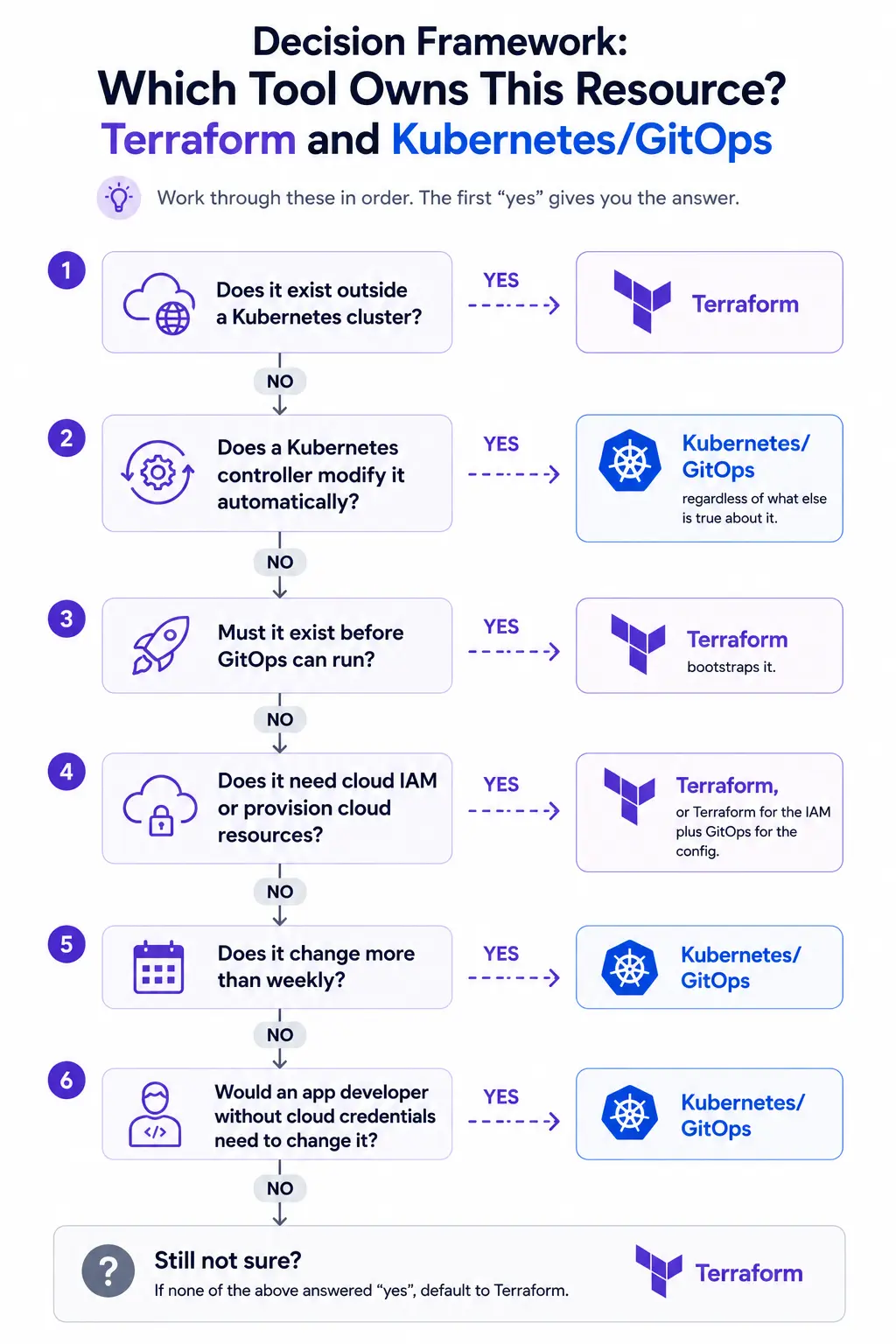
The pattern that works: Terraform bootstraps, GitOps maintains.
Add-on
Bootstrap
Steady state
Why
CNI plugin
Terraform
Terraform
Cluster is non-functional without it
CSI drivers
Terraform
Terraform
Needs cloud IAM Terraform already manages
AWS Load Balancer Controller
Terraform
Terraform
Tightly coupled to IRSA and cloud resources
cert-manager
Terraform
GitOps
Needs DNS/IAM initially, then routine
Ingress controller
Terraform
GitOps
Provisions a cloud LB, then app-adjacent
ArgoCD / Flux
Terraform
Self-managed
Chicken-and-egg: GitOps can’t install GitOps
Monitoring stack
Terraform
GitOps
Needs storage and IAM, then iterates fast
Application workloads
GitOps
GitOps
Never Terraform
Rule of thumb: if it needs cloud IAM or provisions cloud resources, Terraform. If it’s configured frequently by people who don’t have cloud credentials, GitOps.
One practical consequence of this split: when something breaks, the evidence lives in two places. Terraform-provisioned infrastructure emits metrics to your cloud provider’s monitoring. Kubernetes workloads emit to your cluster’s telemetry stack. An incident that starts as “checkout is slow” might be an HPA that can’t scale because the node group hit its Terraform-defined ceiling — and correlating those two facts means querying two systems that share no common identifiers.
Obsium builds the observability layer that spans both, so cluster events and the infrastructure underneath them land in one queryable place with consistent labels. If your last cross-layer incident took hours to diagnose, book a free 30-minute consultation.
Real-world example: microservices on EKS
A concrete walkthrough. An e-commerce platform: three microservices, a Postgres database, public HTTPS traffic, autoscaling.
What Terraform provisions
# Networking
module "vpc" {
  source  = "terraform-aws-modules/vpc/aws"
  version = "~> 6.0"

  name = "prod"
  cidr = "10.0.0.0/16"

  azs             = ["us-east-1a", "us-east-1b", "us-east-1c"]
  private_subnets = ["10.0.1.0/24", "10.0.2.0/24", "10.0.3.0/24"]
  public_subnets  = ["10.0.101.0/24", "10.0.102.0/24", "10.0.103.0/24"]

  enable_nat_gateway = true
  single_nat_gateway = false   # one per AZ for HA

  # Role tags the AWS Load Balancer Controller uses for subnet discovery.
  # The older kubernetes.io/cluster/<name> tag is now optional.
  public_subnet_tags  = { "kubernetes.io/role/elb" = "1" }
  private_subnet_tags = { "kubernetes.io/role/internal-elb" = "1" }
}

# Database
resource "aws_db_instance" "postgres" {
  identifier     = "prod-orders"
  engine         = "postgres"
  engine_version = "17.10"
  instance_class = "db.r6g.large"

  allocated_storage     = 100
  storage_encrypted     = true
  multi_az              = true
  db_subnet_group_name  = aws_db_subnet_group.main.name
  vpc_security_group_ids = [aws_security_group.rds.id]

  backup_retention_period = 30
  skip_final_snapshot     = false
  final_snapshot_identifier = "prod-orders-final"
}

# IAM for a workload, scoped to one service account (IRSA)
module "orders_irsa" {
  # Renamed in v6: was iam-role-for-service-accounts-eks
  source  = "terraform-aws-modules/iam/aws//modules/iam-role-for-service-accounts"
  version = "~> 6.0"

  name            = "orders-service"
  use_name_prefix = false   # defaults to true, which appends a random suffix

  oidc_providers = {
    main = {
      provider_arn               = module.eks.oidc_provider_arn
      namespace_service_accounts = ["production:orders"]
    }
  }
}
What Kubernetes deploys
apiVersion: apps/v1
kind: Deployment
metadata:
  name: orders
  namespace: production
spec:
  replicas: 3
  selector:
    matchLabels:
      app: orders
  strategy:
    type: RollingUpdate
    rollingUpdate:
      maxSurge: 1
      maxUnavailable: 0        # no capacity loss during rollout
  template:
    metadata:
      labels:
        app: orders
    spec:
      serviceAccountName: orders
      containers:
        - name: orders
          image: registry.example.com/orders:1.8.3
          ports:
            - containerPort: 8080
          env:
            - name: DB_HOST
              valueFrom:
                configMapKeyRef:
                  name: orders-config
                  key: db_host
            - name: DB_PASSWORD
              valueFrom:
                secretKeyRef:
                  name: orders-db
                  key: password
          resources:
            requests:
              cpu: 200m
              memory: 256Mi
            limits:
              memory: 512Mi
          readinessProbe:
            httpGet:
              path: /healthz
              port: 8080
            initialDelaySeconds: 5
          livenessProbe:
            httpGet:
              path: /healthz
              port: 8080
            initialDelaySeconds: 15
---
# The IngressClass must exist before any Ingress can reference it.
# It isn't created automatically just because you name it "alb".
apiVersion: networking.k8s.io/v1
kind: IngressClass
metadata:
  name: alb
spec:
  controller: ingress.k8s.aws/alb
---
apiVersion: networking.k8s.io/v1
kind: Ingress
metadata:
  name: storefront
  namespace: production
  annotations:
    alb.ingress.kubernetes.io/scheme: internet-facing
    alb.ingress.kubernetes.io/target-type: ip
spec:
  ingressClassName: alb
  rules:
    - host: shop.example.com
      http:
        paths:
          - path: /orders
            pathType: Prefix
            backend:
              service:
                name: orders
                port:
                  number: 80
Note the interaction: the Ingress creates a real AWS Application Load Balancer, using subnets Terraform tagged and IAM permissions Terraform granted. Kubernetes is provisioning cloud infrastructure through a controller that Terraform set up. The layers aren’t sealed off from each other; they hand off.
Who owns what
Resource
Owner
Why
VPC, subnets, NAT
Terraform
Cloud API, changes rarely
RDS instance
Terraform
Cloud API, stateful, careful lifecycle
EKS control plane
Terraform
Cloud API
Node groups
Terraform
Cloud API (but ignore autoscaler-managed counts)
IAM roles / IRSA
Terraform
Cloud API
Subnet tags for ALB
Terraform
Cloud API, and the controller depends on them
AWS Load Balancer Controller
Terraform
Needs IRSA, cluster-critical
Deployment
GitOps
Changes multiple times daily
Service, Ingress
GitOps
Application routing
ConfigMap
GitOps
Application config
Secret values
External store
Never in Terraform state or Git
HPA
GitOps
Actively mutates the Deployment
The ALB the Ingress creates
Neither, directly
Controller-managed; don’t import into Terraform
What happens when you need to change something
Scale the app to handle Black Friday: adjust HPA maxReplicas in Git, ArgoCD syncs it. If nodes run out, Cluster Autoscaler adds them within the Terraform-defined maximum. If you hit that maximum, then you touch Terraform.
Add a database read replica: Terraform change, reviewed as a plan, applied through the infrastructure pipeline. The app picks it up via a ConfigMap change through GitOps. Two pipelines, two cadences, in that order.
Deploy a new version of the orders service: CI builds and pushes the image, updates the tag in Git, ArgoCD syncs, rolling update proceeds with maxUnavailable: 0. Terraform is not involved and shouldn’t be.
Common mistakes
Mistake
Why it hurts
Do instead
Using Terraform to orchestrate applications
No rollback, no health checks, no progressive delivery. Terraform doesn’t know if your app works
GitOps (ArgoCD/Flux) for workloads
Managing Deployments in Terraform alongside HPA
Perpetual fight over replica count; downscaling during traffic spikes
Let Kubernetes own anything a controller mutates
Local state files
One laptop holds production truth
Remote backend with locking, day one
One monolithic state file
Huge blast radius, slow plans, painful conflicts
Split by lifecycle: network / cluster / data / apps
Same repo and pipeline for infra and apps
Deploys blocked behind infrastructure review
Separate repos, separate pipelines, separate cadence
Unpinned provider versions
Provider update silently changes plan output
Pin in required_providers, upgrade deliberately
Bumping a major module version without reading the upgrade guide
Arguments get renamed and removed, not deprecated. EKS module v21 renamed cluster_name → name and cluster_version → kubernetes_version; v20 config fails outright
Read UPGRADE-<version>.md before every major bump
Pinning a Kubernetes version near end of standard support
Silently rolls into extended support pricing
Track the provider’s version support calendar
kubernetes_manifest for CRs before the CRD exists
Plan fails; the provider needs the CRD at plan time
Install CRDs first, or use GitOps for CRs
Secrets in Terraform variables
Plaintext in state
External Secrets Operator or cloud secret manager
Importing controller-created resources
Terraform fights the controller that created them
Leave controller-managed cloud resources alone
Skimming plan output because it’s always noisy
You stop noticing real destructive changes
Fix the noise with ignore_changes; keep plans meaningful
Best practices
Boundary
[ ] Terraform owns resources that change only when a human changes them
[ ] Kubernetes/GitOps owns anything a controller mutates
[ ] Cluster add-ons bootstrapped by Terraform, maintained by GitOps
[ ] Ownership documented so nobody has to guess
Terraform hygiene
[ ] Remote state with locking, encrypted at rest
[ ] State split by lifecycle and blast radius
[ ] Provider and module versions pinned
[ ] Plan reviewed on every PR, applied only from the pipeline
[ ] Modules for anything used more than twice
[ ] terraform plan output that’s clean enough to actually read
Kubernetes and GitOps
[ ] ArgoCD or Flux reconciling from Git
[ ] Separate repositories for infrastructure and applications
[ ] Resource requests and limits on every workload
[ ] Readiness and liveness probes configured
[ ] maxUnavailable: 0 for zero-downtime rollouts
Security
[ ] Workload identity (IRSA / Workload Identity) rather than node-level IAM
[ ] Secrets in an external store, injected at runtime
[ ] Policy as code on both layers (Sentinel/OPA for Terraform, Kyverno/Gatekeeper for Kubernetes)
[ ] IaC scanning in CI (tfsec, Checkov, Trivy)
Operations
[ ] Drift detection running on a schedule, not just at deploy time
[ ] Observability spanning infrastructure and workloads with shared labels
[ ] Runbooks that name which tool owns the resource in question
Decision framework: which tool owns this resource?
Work through these in order. The first “yes” gives you the answer.
If it’s…
Owner
VPC, subnet, security group
Terraform
Managed database, cache, queue
Terraform
Kubernetes cluster and node groups
Terraform
IAM role, policy, service account binding
Terraform
DNS record, TLS certificate (cloud-issued)
Terraform
CNI, CSI, load balancer controller
Terraform
ArgoCD/Flux itself
Terraform (then self-managing)
cert-manager, monitoring stack
Terraform bootstrap → GitOps
Deployment, StatefulSet, DaemonSet
GitOps
Service, Ingress, NetworkPolicy
GitOps
ConfigMap, HPA, PodDisruptionBudget
GitOps
Namespace
Either; pick one and be consistent
Secret values
Neither; external secret store
Platform engineering absorbs both. CNCF’s survey segments organizations by maturity and finds GitOps adoption tracks it closely: 58% among the most mature “innovator” tier, against 23% of “adopters” (CNCF 2025). Increasingly the answer to “Terraform or Kubernetes” is that a platform team owns both and exposes a golden path so application teams touch neither directly. We covered the discipline in platform engineering explained.
GitOps becomes the default for in-cluster. Terraform’s role is settling into provisioning and bootstrap, with continuous reconciliation handled by ArgoCD or Flux.
Control-plane-as-API blurs the line. Crossplane and cloud operators (AWS ACK, Azure Service Operator, GCP Config Connector) let you provision cloud resources through the Kubernetes API. It’s a real pattern, but troubleshooting moves inside the cluster and provider coverage still trails Terraform’s.
AI-assisted IaC arrives with caveats. Generating Terraform and manifests from prompts works reasonably for common patterns. It’s also confidently wrong about IAM scoping and security defaults, so plan review matters more, not less.
The OpenTofu split persists. HashiCorp moved Terraform from MPL 2.0 to the BUSL licence in August 2023. OpenTofu forked from the last MPL-licensed code, corresponding to v1.5.7, and now ships independently. Both are viable, and organizations with licence-sensitive procurement increasingly pick OpenTofu.
Conclusion
Terraform and Kubernetes occupy adjacent layers rather than competing for the same one, and nearly every production Kubernetes environment has Terraform somewhere underneath it.
What to take away:
Terraform provisions; Kubernetes orchestrates. Different layers, different lifecycles.
The boundary exists for a technical reason. Kubernetes controllers mutate resources continuously; Terraform assumes sole authorship. That conflict is real and it produces phantom drift.
The ownership test: Terraform owns what changes only when a human changes it. Kubernetes owns what changes on its own.
The HPA trap is the canonical example. If you’re reaching for ignore_changes on Kubernetes resources, ownership is probably in the wrong place.
Bootstrap add-ons with Terraform, maintain with GitOps. This resolves most of the ambiguous middle layer.
Separate repos and pipelines. Infrastructure and applications change at different speeds.
Fix your state management before anything else on this list.
Next steps: audit which tool currently owns each resource type, find anywhere ignore_changes is papering over a boundary problem, confirm state is remote and split sensibly, then separate pipelines if you haven’t.
Where Obsium fits
The boundary looks tidy in a diagram and much less tidy during an incident. Real failures cross it constantly:
A pod that won’t schedule because a node group hit a Terraform-defined ceiling.
A service failing because an IAM role Terraform manages lost a permission.
Latency that turns out to be a subnet routing change from last week’s apply.
Diagnosing those means correlating infrastructure state with cluster telemetry, and by default those live in separate systems with no shared identifiers.
Obsium builds that correlation layer for engineering teams — consistent labeling across both layers, telemetry pipelines that span cloud and cluster, and alerting that routes to whoever owns the resource rather than whoever is on call. If you’re running Terraform-provisioned Kubernetes and your incidents keep turning into archaeology, book a free 30-minute consultation. An engineer will look at your setup and tell you where the visibility gaps are.
FAQs
What is the difference between Terraform and Kubernetes?
Terraform provisions infrastructure through cloud APIs — VPCs, databases, IAM, and Kubernetes clusters themselves. Kubernetes orchestrates containers running on infrastructure. Terraform builds the environment; Kubernetes runs the applications inside it.
Can Terraform replace Kubernetes?
No. Terraform has no runtime component. It can’t restart a crashed container, shift traffic away from an unhealthy pod, or scale in response to load. It runs, makes changes, and exits.
Can Kubernetes replace Terraform?
Partially, through Crossplane or cloud operators like AWS ACK, which let you manage cloud resources via the Kubernetes API. In practice provider coverage is narrower and troubleshooting is harder, since a successful kubectl apply only means the resource was accepted, not that the cloud resource was created.
Do you need Terraform if you use Kubernetes?
You need something to create the cluster and the surrounding cloud resources. That could be Terraform, OpenTofu, Pulumi, CloudFormation, or a CLI. Terraform is the common choice because it handles the whole estate, not just the cluster.
Should I use Terraform to deploy Kubernetes applications?
Generally no. Terraform lacks rollback, health-gated rollouts, and progressive delivery, and it fights controllers that mutate your resources. Use GitOps for workloads. The exception is a small number of bootstrap resources that must exist before GitOps runs.
What is the Terraform Kubernetes provider used for?
Legitimately: bootstrapping cluster-critical resources before GitOps exists, and creating resources that need values Terraform holds (like an IAM role ARN). Not for ongoing application management.
What is the difference between Terraform state and Kubernetes desired state?
Terraform state is a file recording what it created, compared against config when you run it. Kubernetes desired state lives in etcd and is compared against reality continuously by controllers. One is a periodic checkpoint; the other is a permanent control loop.
Is Terraform still relevant given Kubernetes operators?
Yes. Operators cover a fraction of cloud services, are less mature, and complicate troubleshooting by moving failures into controller logs. Terraform’s plan step also has no operator equivalent — you see the diff before anything changes.
An honest look at where cloud economics break down, what on-premise infrastructure really costs, and how enterprises are making smarter workload-specific decisions in 2026.